
How to Build a Sample Microservices Application Using ASP.NET Core, Apache Kafka, and Docker
Microservices architecture has become increasingly popular for building scalable, maintainable applications. In this comprehensive tutorial, we’ll build a sample e-commerce application with two microservices using ASP.NET Core, Apache Kafka for event-driven communication, and Docker for containerization.
What We’ll Build
We’ll create a simple e-commerce system with two microservices:
- Product Service: Manages product catalog
- Order Service: Handles order processing
These services will communicate through Apache Kafka events, each having its own SQL Server database. When a product is created, the Product Service will publish a ProductCreated event. The Order Service will subscribe to this event to update its local cache or perform other actions. On the other hand, when an order is created, the Order Service will publish an OrderCreated event and the Product Service can listen to it for inventory updates.
Prerequisites
Before we start, make sure you have:
- .NET 10 SDK
- Docker Desktop
- Visual Studio 2026 or Visual Studio Code
- Basic knowledge of ASP.NET Core, Docker, and microservices concepts
Project Structure
Let’s start by creating our solution structure:
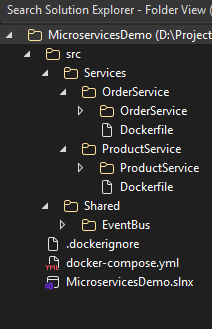
Step 1: Create the Solution and Projects
Open a terminal and create the solution structure:
mkdir MicroservicesDemo
cd MicroservicesDemo

# Create solution file
dotnet new sln

# Create directories
mkdir -p src/Services/ProductService
mkdir -p src/Services/OrderService
mkdir -p src/Shared/EventBus

# Create projects
cd src/Services/ProductService
dotnet new webapi -n ProductService

cd ../OrderService
dotnet new webapi -n OrderService

cd ../../Shared/EventBus
dotnet new classlib -n EventBus

# Add projects to solution
cd ../../../
dotnet sln add .\src\Services\ProductService\ProductService\ProductService.csproj

dotnet sln add .\src\Services\OrderService\OrderService\OrderService.csproj
dotnet sln add .\src\Shared\EventBus\EventBus\EventBus.csproj
Step 2: Create Shared Event Bus Library
First, let’s create our shared event bus library for Kafka integration. The purpose of this library is to provide a common interface and implementation for publishing and subscribing to events using Apache Kafka.
Create Event Bus Interface
Create the IEventBus interface in the EventBus project. The interface will define methods for publishing and subscribing to events.
EventBus/IEventBus.cs
using System.Threading.Tasks;

namespace EventBus
{
    public interface IEventBus
    {
        Task PublishAsync<T>(T @event) where T : class;
        Task SubscribeAsync<T>(Func<T, Task> handler) where T : class;
    }
}
Create Base Event Class
Create a base event class name BaseEvent that other events will inherit from. This abstract class has properties for event ID and creation timestamp which are common to all events.
EventBus/Events/BaseEvent.cs
using System;

namespace EventBus.Events
{
    public abstract class BaseEvent
    {
        public Guid Id { get; protected set; }
        public DateTime CreatedAt { get; protected set; }

        protected BaseEvent()
        {
            Id = Guid.NewGuid();
            CreatedAt = DateTime.UtcNow;
        }
    }
}
Create ProductCreatedEvent
Create the ProductCreatedEvent class that represents the event published when a new product is created.
EventBus/Events/ProductCreatedEvent.cs
namespace EventBus.Events
{
    public class ProductCreatedEvent : BaseEvent
    {
        public int ProductId { get; set; }
        public string Name { get; set; }
        public decimal Price { get; set; }
        public int Stock { get; set; }
    }
}
Create OrderCreatedEvent
Create the OrderCreatedEvent class that represents the event published when a new order is created.
EventBus/Events/OrderCreatedEvent.cs
namespace EventBus.Events
{
    public class OrderCreatedEvent : BaseEvent
    {
        public int OrderId { get; set; }
        public int ProductId { get; set; }
        public int Quantity { get; set; }
        public decimal TotalPrice { get; set; }
        public string CustomerEmail { get; set; }
    }
}
Create ProductUpdatedEvent
Create the ProductUpdatedEvent class that represents the event published when a product is updated.
EventBus/Events/ProductUpdatedEvent.cs
namespace EventBus.Events
{
    public class ProductUpdatedEvent : BaseEvent
    {
        public int ProductId { get; set; }
        public string Name { get; set; }
        public string Description { get; set; }
        public decimal Price { get; set; }
        public int Stock { get; set; }
        public decimal PreviousPrice { get; set; }
        public int PreviousStock { get; set; }
    }
}
Create KafkaEventBus Implementation
Now, let’s implement the KafkaEventBus class that uses Confluent.Kafka to publish and subscribe to events. In this implementation, we will handle event serialization/deserialization, topic management, and error handling. KafkaEventBus implements the IEventBus interface using Apache Kafka as the underlying message broker, featuring core properties like _producer for publishing events, _consumer for receiving messages, _handlers dictionary to store event type-specific callback functions, and _subscribedTopics list to track active subscriptions. The PublishAsync
EventBus/KafkaEventBus.cs
using Confluent.Kafka;
using System.Text.Json;
using Microsoft.Extensions.Logging;
using Microsoft.Extensions.Configuration;

namespace EventBus
{
    public class KafkaEventBus : IEventBus, IDisposable
    {
        private readonly IProducer<string, string> _producer;
        private readonly IConsumer<string, string> _consumer;
        private readonly ILogger<KafkaEventBus> _logger;
        private readonly string _topicPrefix;
        private readonly Dictionary<string, Func<string, Task>> _handlers = new();
        private readonly List<string> _subscribedTopics = new();
        private bool _isConsuming = false;

        public KafkaEventBus(IConfiguration configuration, ILogger<KafkaEventBus> logger)
        {
            _logger = logger;
            _topicPrefix = configuration["Kafka:TopicPrefix"] ?? "microservices";

            var producerConfig = new ProducerConfig
            {
                BootstrapServers = configuration["Kafka:BootstrapServers"]
            };

            var consumerConfig = new ConsumerConfig
            {
                BootstrapServers = configuration["Kafka:BootstrapServers"],
                GroupId = configuration["Kafka:GroupId"],
                AutoOffsetReset = AutoOffsetReset.Earliest
            };

            _producer = new ProducerBuilder<string, string>(producerConfig).Build();
            _consumer = new ConsumerBuilder<string, string>(consumerConfig).Build();
        }

        public async Task PublishAsync<T>(T @event) where T : class
        {
            var topic = $"{_topicPrefix}.{typeof(T).Name}";
            var message = JsonSerializer.Serialize(@event);

            try
            {
                var result = await _producer.ProduceAsync(topic, new Message<string, string>
                {
                    Key = Guid.NewGuid().ToString(),
                    Value = message
                });

                _logger.LogInformation($"Event published to topic {topic}: {result.Status}");
            }
            catch (Exception ex)
            {
                _logger.LogError(ex, $"Failed to publish event to topic {topic}");
                throw;
            }
        }

        public async Task SubscribeAsync<T>(Func<T, Task> handler) where T : class
        {
            var topic = $"{_topicPrefix}.{typeof(T).Name}";
            _logger.LogInformation($"Subscribing to topic: {topic}");

            try
            {
                // Store the handler for this topic
                _handlers[topic] = async (message) =>
                {
                    var @event = JsonSerializer.Deserialize<T>(message);
                    await handler(@event);
                };

                _subscribedTopics.Add(topic);
                _logger.LogInformation($"Added topic {topic} to subscription list");

                // Start the consumer if not already started
                if (!_isConsuming)
                {
                    await StartConsumerAsync();
                }
                else
                {
                    // Re-subscribe to all topics
                    _consumer.Subscribe(_subscribedTopics);
                    _logger.LogInformation($"Re-subscribed to all topics: {string.Join(", ", _subscribedTopics)}");
                }

                _logger.LogInformation($"Successfully subscribed to topic: {topic}");
            }
            catch (Exception ex)
            {
                _logger.LogError(ex, $"Failed to subscribe to topic: {topic}");
                throw;
            }
        }

        private async Task StartConsumerAsync()
        {
            _isConsuming = true;
            _consumer.Subscribe(_subscribedTopics);
            _logger.LogInformation($"Subscribed to topics: {string.Join(", ", _subscribedTopics)}");

            _ = Task.Run(async () =>
            {
                _logger.LogInformation($"Starting consumer task for topics: {string.Join(", ", _subscribedTopics)}");
                while (true)
                {
                    try
                    {
                        _logger.LogDebug($"Polling for messages on topics: {string.Join(", ", _subscribedTopics)}...");
                        var consumeResult = _consumer.Consume(TimeSpan.FromMilliseconds(1000));
                        if (consumeResult != null)
                        {
                            var topic = consumeResult.Topic;
                            _logger.LogInformation($"Received message from topic {topic}: {consumeResult.Message.Value}");

                            if (_handlers.TryGetValue(topic, out var handler))
                            {
                                await handler(consumeResult.Message.Value);
                                _consumer.Commit(consumeResult);
                                _logger.LogInformation($"Successfully processed message from topic {topic}");
                            }
                            else
                            {
                                _logger.LogWarning($"No handler found for topic {topic}");
                            }
                        }
                        else
                        {
                            _logger.LogDebug($"No message received from any topic, continuing polling...");
                        }
                    }
                    catch (Exception ex)
                    {
                        _logger.LogError(ex, $"Error consuming message from topics");
                    }
                }
            });
        }

        public void Dispose()
        {
            _producer?.Dispose();
            _consumer?.Dispose();
        }
    }
}
Update EventBus.csproj
Finally, update the EventBus.csproj file to include the necessary NuGet packages for Kafka integration and logging.
EventBus/EventBus.csproj
<Project Sdk="Microsoft.NET.Sdk">

  <PropertyGroup>
    <TargetFramework>net8.0</TargetFramework>
    <ImplicitUsings>enable</ImplicitUsings>
    <Nullable>enable</Nullable>
  </PropertyGroup>

  <ItemGroup>
    <PackageReference Include="Confluent.Kafka" Version="2.3.0" />
    <PackageReference Include="Microsoft.Extensions.Configuration.Abstractions" Version="8.0.0" />
    <PackageReference Include="Microsoft.Extensions.Logging.Abstractions" Version="8.0.0" />
  </ItemGroup>

</Project>
Step 3: Build Product Service
Create Product Model
Create the Product model class that represents the product entity in the Product Service.
ProductService/Models/Product.cs
using System.ComponentModel.DataAnnotations;

namespace ProductService.Models
{
    public class Product
    {
        public int Id { get; set; }

        [Required]
        [StringLength(100)]
        public string Name { get; set; } = string.Empty;

        [StringLength(500)]
        public string Description { get; set; } = string.Empty;

        [Required]
        [Range(0.01, double.MaxValue)]
        public decimal Price { get; set; }

        [Required]
        [Range(0, int.MaxValue)]
        public int Stock { get; set; }

        public DateTime CreatedAt { get; set; } = DateTime.UtcNow;
    }
}
Create ProductContext
Create the ProductContext class that represents the Entity Framework Core database context for the Product Service.
ProductService/Data/ProductContext.cs
using Microsoft.EntityFrameworkCore;
using ProductService.Models;

namespace ProductService.Data
{
    public class ProductContext : DbContext
    {
        public ProductContext(DbContextOptions<ProductContext> options) : base(options) { }

        public DbSet<Product> Products { get; set; }

        protected override void OnModelCreating(ModelBuilder modelBuilder)
        {
            modelBuilder.Entity<Product>(entity =>
            {
                entity.HasKey(e => e.Id);
                entity.Property(e => e.Name).IsRequired().HasMaxLength(100);
                entity.Property(e => e.Description).HasMaxLength(500);
                entity.Property(e => e.Price).HasColumnType("decimal(18,2)");
                entity.HasIndex(e => e.Name);
            });
        }
    }
}
Create OrderEventHandler
Create the OrderEventHandler class that will handle events from the Order Service. OrderEventHandler is called automatically when an order is placed in the OrderService through the event-driven architecture. It is configured in Program.cs file.
ProductService/Services/OrderEventHandler.cs
using EventBus.Events;
using ProductService.Data;
using Microsoft.EntityFrameworkCore;
using EventBus;

namespace ProductService.Services
{
    public class OrderEventHandler
    {
        private readonly ILogger<OrderEventHandler> _logger;
        private readonly IServiceScopeFactory _scopeFactory;

        public OrderEventHandler(ILogger<OrderEventHandler> logger, IServiceScopeFactory scopeFactory)
        {
            _logger = logger;
            _scopeFactory = scopeFactory;
        }

        public async Task Handle(OrderCreatedEvent @event)
        {
            _logger.LogInformation($"Order created event received: Order {@event.OrderId}, Product {@event.ProductId}, Quantity {@event.Quantity}");

            using var scope = _scopeFactory.CreateScope();
            var context = scope.ServiceProvider.GetRequiredService<ProductContext>();
            var eventBus = scope.ServiceProvider.GetRequiredService<IEventBus>();

            try
            {
                // Find the product
                var product = await context.Products.FindAsync(@event.ProductId);
                if (product != null)
                {
                    // Update product stock (reduce by order quantity)
                    if (product.Stock >= @event.Quantity)
                    {
                        var originalStock = product.Stock;
                        product.Stock -= @event.Quantity;
                        await context.SaveChangesAsync();

                        _logger.LogInformation($"Product {product.Id} stock updated. Stock: {originalStock} → {product.Stock}");

                        // Publish ProductUpdatedEvent to notify other services about stock change
                        var productUpdatedEvent = new ProductUpdatedEvent
                        {
                            ProductId = product.Id,
                            Name = product.Name,
                            Description = product.Description,
                            Price = product.Price,
                            Stock = product.Stock,
                            PreviousStock = originalStock,
                            PreviousPrice = product.Price  // Price didn't change
                        };

                        await eventBus.PublishAsync(productUpdatedEvent);
                        _logger.LogInformation($"ProductUpdatedEvent published for Product {product.Id} due to order {@event.OrderId}");

                        // Check if stock is low
                        if (product.Stock <= 10)
                        {
                            _logger.LogWarning($"LOW STOCK ALERT: Product {product.Name} (ID: {product.Id}) has only {product.Stock} units remaining!");
                        }
                    }
                    else
                    {
                        _logger.LogWarning($"Insufficient stock for Product {product.Id}. Available: {product.Stock}, Requested: {@event.Quantity}");
                    }
                }
                else
                {
                    _logger.LogWarning($"Product with ID {@event.ProductId} not found when processing order {@event.OrderId}");
                }
            }
            catch (Exception ex)
            {
                _logger.LogError(ex, $"Error processing order created event for Order {@event.OrderId}");
            }
        }
    }
}
Create ProductsController
Create the ProductsController class that exposes RESTful APIs for managing products in the Product Service.
ProductService/Controllers/ProductsController.cs
using Microsoft.AspNetCore.Mvc;
using Microsoft.EntityFrameworkCore;
using ProductService.Data;
using ProductService.Models;
using EventBus;
using EventBus.Events;

namespace ProductService.Controllers
{
    [ApiController]
    [Route("api/[controller]")]
    public class ProductsController : ControllerBase
    {
        private readonly ProductContext _context;
        private readonly IEventBus _eventBus;
        private readonly ILogger<ProductsController> _logger;

        public ProductsController(ProductContext context, IEventBus eventBus, ILogger<ProductsController> logger)
        {
            _context = context;
            _eventBus = eventBus;
            _logger = logger;
        }

        [HttpGet]
        public async Task<ActionResult<IEnumerable<Product>>> GetProducts()
        {
            return await _context.Products.ToListAsync();
        }

        [HttpGet("{id}")]
        public async Task<ActionResult<Product>> GetProduct(int id)
        {
            var product = await _context.Products.FindAsync(id);
            if (product == null)
                return NotFound();

            return product;
        }

        [HttpPost]
        public async Task<ActionResult<Product>> CreateProduct(Product product)
        {
            _context.Products.Add(product);
            await _context.SaveChangesAsync();

            // Publish event
            var productCreatedEvent = new ProductCreatedEvent
            {
                ProductId = product.Id,
                Name = product.Name,
                Price = product.Price,
                Stock = product.Stock
            };

            await _eventBus.PublishAsync(productCreatedEvent);
            _logger.LogInformation($"Product created and event published: {product.Name}");

            return CreatedAtAction(nameof(GetProduct), new { id = product.Id }, product);
        }

        [HttpPut("{id}")]
        public async Task<IActionResult> UpdateProduct(int id, Product product)
        {
            if (id != product.Id)
                return BadRequest();

            // Get the original product to track changes
            var originalProduct = await _context.Products.AsNoTracking().FirstOrDefaultAsync(p => p.Id == id);
            if (originalProduct == null)
                return NotFound();

            _context.Entry(product).State = EntityState.Modified;

            try
            {
                await _context.SaveChangesAsync();

                // Publish product updated event
                var productUpdatedEvent = new ProductUpdatedEvent
                {
                    ProductId = product.Id,
                    Name = product.Name,
                    Description = product.Description,
                    Price = product.Price,
                    Stock = product.Stock,
                    PreviousPrice = originalProduct.Price,
                    PreviousStock = originalProduct.Stock
                };

                await _eventBus.PublishAsync(productUpdatedEvent);
                _logger.LogInformation($"Product updated and event published: {product.Name}. Price: ${originalProduct.Price} → ${product.Price}, Stock: {originalProduct.Stock} → {product.Stock}");
            }
            catch (DbUpdateConcurrencyException)
            {
                if (!ProductExists(id))
                    return NotFound();
                throw;
            }

            return NoContent();
        }

        [HttpDelete("{id}")]
        public async Task<IActionResult> DeleteProduct(int id)
        {
            var product = await _context.Products.FindAsync(id);
            if (product == null)
                return NotFound();

            _context.Products.Remove(product);
            await _context.SaveChangesAsync();

            return NoContent();
        }

        [HttpGet("low-stock")]
        public async Task<ActionResult<IEnumerable<object>>> GetLowStockProducts([FromQuery] int threshold = 10)
        {
            var lowStockProducts = await _context.Products
                .Where(p => p.Stock <= threshold)
                .Select(p => new
                {
                    p.Id,
                    p.Name,
                    p.Stock,
                    p.Price,
                    Status = p.Stock == 0 ? "Out of Stock" : "Low Stock"
                })
                .ToListAsync();

            return Ok(lowStockProducts);
        }

        [HttpPut("{id}/stock")]
        public async Task<IActionResult> UpdateStock(int id, [FromBody] UpdateStockRequest request)
        {
            var product = await _context.Products.FindAsync(id);
            if (product == null)
                return NotFound();

            var originalStock = product.Stock;
            product.Stock = request.NewStock;
            await _context.SaveChangesAsync();

            // Publish ProductUpdatedEvent for stock changes
            var productUpdatedEvent = new ProductUpdatedEvent
            {
                ProductId = product.Id,
                Name = product.Name,
                Description = product.Description,
                Price = product.Price,
                Stock = product.Stock,
                PreviousStock = originalStock,
                PreviousPrice = product.Price  // Price didn't change, so previous = current
            };

            await _eventBus.PublishAsync(productUpdatedEvent);
            _logger.LogInformation($"Stock updated for product {product.Name}: {originalStock} → {request.NewStock} and event published");

            return NoContent();
        }

        private bool ProductExists(int id)
        {
            return _context.Products.Any(e => e.Id == id);
        }
    }

    public record UpdateStockRequest(int NewStock);
}
Modify Program.cs
Modify the Program.cs as follows to set up the services, database context, and event subscriptions.
ProductService/Program.cs
using Microsoft.EntityFrameworkCore;
using ProductService.Data;
using ProductService.Services;
using EventBus;
using EventBus.Events;

var builder = WebApplication.CreateBuilder(args);

// Add services to the container
builder.Services.AddControllers();
builder.Services.AddEndpointsApiExplorer();
builder.Services.AddSwaggerGen(c =>
{
    c.SwaggerDoc("v1", new Microsoft.OpenApi.Models.OpenApiInfo
    {
        Title = "Product Service API",
        Version = "v1",
        Description = "API for managing products in the microservices demo",
        Contact = new Microsoft.OpenApi.Models.OpenApiContact
        {
            Name = "Product Service Team",
            Email = "products@microservicesdemo.com"
        }
    });
});

// Add Entity Framework
builder.Services.AddDbContext<ProductContext>(options =>
    options.UseSqlServer(builder.Configuration.GetConnectionString("DefaultConnection")));

// Add EventBus
builder.Services.AddSingleton<IEventBus, KafkaEventBus>();

// Add Event Handlers
builder.Services.AddScoped<OrderEventHandler>();

var app = builder.Build();

// Configure the HTTP request pipeline
if (app.Environment.IsDevelopment())
{
    app.UseSwagger();
    app.UseSwaggerUI(c =>
    {
        c.SwaggerEndpoint("/swagger/v1/swagger.json", "Product Service API v1");
        c.RoutePrefix = "swagger";
        c.DocumentTitle = "Product Service API Documentation";
    });
}

app.UseAuthorization();
app.MapControllers();

// Ensure database is created with retry logic
using (var scope = app.Services.CreateScope())
{
    var context = scope.ServiceProvider.GetRequiredService<ProductContext>();
    var logger = scope.ServiceProvider.GetRequiredService<ILogger<Program>>();

    var retryCount = 0;
    var maxRetries = 30;

    while (retryCount < maxRetries)
    {
        try
        {
            logger.LogInformation("Attempting to connect to database, attempt {Attempt}", retryCount + 1);
            context.Database.EnsureCreated();
            logger.LogInformation("Database connection successful!");
            break;
        }
        catch (Exception ex)
        {
            retryCount++;
            logger.LogWarning("Database connection failed (attempt {Attempt}/{MaxAttempts}): {Error}", retryCount, maxRetries, ex.Message);

            if (retryCount >= maxRetries)
            {
                logger.LogError("Failed to connect to database after {MaxAttempts} attempts. Exiting.", maxRetries);
                throw;
            }

            await Task.Delay(2000);
        }
    }
}

// Subscribe to events
using (var scope = app.Services.CreateScope())
{
    var eventBus = scope.ServiceProvider.GetRequiredService<IEventBus>();
    var orderEventHandler = scope.ServiceProvider.GetRequiredService<OrderEventHandler>();
    var logger = scope.ServiceProvider.GetRequiredService<ILogger<Program>>();

    logger.LogInformation("Subscribing to OrderCreatedEvent...");
    await eventBus.SubscribeAsync<OrderCreatedEvent>(orderEventHandler.Handle);
    logger.LogInformation("Successfully subscribed to OrderCreatedEvent");
}

app.Run();
Modify appsettings.json
Modify the appsettings.json as follows to include the database connection string and Kafka configuration.
ProductService/appsettings.json
{
  "ConnectionStrings": {
    "DefaultConnection": "Server=sqlserver,1433;Database=ProductsDB;User Id=sa;Password=YourPassword123!;TrustServerCertificate=True;"
  },
  "Kafka": {
    "BootstrapServers": "kafka:9092",
    "TopicPrefix": "ecommerce",
    "GroupId": "product-service"
  },
  "Logging": {
    "LogLevel": {
      "Default": "Information",
      "Microsoft.AspNetCore": "Warning"
    }
  },
  "AllowedHosts": "*"
}
Update ProductService.csproj
Update the ProductService.csproj file to include the necessary NuGet packages for Entity Framework Core, Swagger, and reference the EventBus project. It also references the shared EventBus project to enable event-driven communication.
ProductService/ProductService.csproj
<Project Sdk="Microsoft.NET.Sdk.Web">

  <PropertyGroup>
    <TargetFramework>net8.0</TargetFramework>
    <Nullable>enable</Nullable>
    <ImplicitUsings>enable</ImplicitUsings>
  </PropertyGroup>

  <ItemGroup>
    <PackageReference Include="Microsoft.AspNetCore.OpenApi" Version="8.0.0" />
    <PackageReference Include="Swashbuckle.AspNetCore" Version="6.5.0" />
    <PackageReference Include="Microsoft.EntityFrameworkCore" Version="8.0.0" />
    <PackageReference Include="Microsoft.EntityFrameworkCore.SqlServer" Version="8.0.0" />
    <PackageReference Include="Microsoft.EntityFrameworkCore.Design" Version="8.0.0" />
  </ItemGroup>

  <ItemGroup>
    <ProjectReference Include="..\..\..\Shared\EventBus\EventBus\EventBus.csproj" />
  </ItemGroup>

</Project>
Step 4: Build Order Service
Create Order Model
Create the Order model class that represents the order entity in the Order Service.
OrderService/Models/Order.cs
using System.ComponentModel.DataAnnotations;

namespace OrderService.Models
{
    public class Order
    {
        public int Id { get; set; }

        [Required]
        public int ProductId { get; set; }

        [Required]
        [StringLength(100)]
        public string ProductName { get; set; } = string.Empty;

        [Required]
        [Range(1, int.MaxValue)]
        public int Quantity { get; set; }

        [Required]
        [Range(0.01, double.MaxValue)]
        public decimal UnitPrice { get; set; }

        [Required]
        [Range(0.01, double.MaxValue)]
        public decimal TotalPrice { get; set; }

        [Required]
        [EmailAddress]
        [StringLength(100)]
        public string CustomerEmail { get; set; } = string.Empty;

        public OrderStatus Status { get; set; } = OrderStatus.Pending;

        public DateTime CreatedAt { get; set; } = DateTime.UtcNow;
    }

    public enum OrderStatus
    {
        Pending,
        Confirmed,
        Cancelled,
        Shipped,
        Delivered
    }
}
Create ProductCache Model
Create the ProductCache model class that represents a cached product in the Order Service.
OrderService/Models/ProductCache.cs
using System.ComponentModel.DataAnnotations;

namespace OrderService.Models
{
    public class ProductCache
    {
        public int Id { get; set; }

        [Required]
        public int ProductId { get; set; }

        [Required]
        [StringLength(100)]
        public string Name { get; set; } = string.Empty;

        [StringLength(500)]
        public string Description { get; set; } = string.Empty;

        [Required]
        public decimal Price { get; set; }

        [Required]
        public int Stock { get; set; }

        public DateTime LastUpdated { get; set; } = DateTime.UtcNow;

        public bool IsAvailable { get; set; } = true;
    }
}
Create OrderContext
Create the OrderContext class that represents the Entity Framework Core database context for the Order Service.
OrderService/Data/OrderContext.cs
using Microsoft.EntityFrameworkCore;
using OrderService.Models;

namespace OrderService.Data
{
    public class OrderContext : DbContext
    {
        public OrderContext(DbContextOptions<OrderContext> options) : base(options) { }

        public DbSet<Order> Orders { get; set; }
        public DbSet<ProductCache> ProductCache { get; set; }

        protected override void OnModelCreating(ModelBuilder modelBuilder)
        {
            modelBuilder.Entity<Order>(entity =>
            {
                entity.HasKey(e => e.Id);
                entity.Property(e => e.ProductName).IsRequired().HasMaxLength(100);
                entity.Property(e => e.CustomerEmail).IsRequired().HasMaxLength(100);
                entity.Property(e => e.UnitPrice).HasColumnType("decimal(18,2)");
                entity.Property(e => e.TotalPrice).HasColumnType("decimal(18,2)");
                entity.Property(e => e.Status).HasConversion<string>();
                entity.HasIndex(e => e.CustomerEmail);
                entity.HasIndex(e => e.Status);
            });

            modelBuilder.Entity<ProductCache>(entity =>
            {
                entity.HasKey(e => e.Id);
                entity.Property(e => e.Name).IsRequired().HasMaxLength(100);
                entity.Property(e => e.Description).HasMaxLength(500);
                entity.Property(e => e.Price).HasColumnType("decimal(18,2)");
                entity.HasIndex(e => e.Name);
            });
        }
    }
}
Create ProductEventHandler
Create the ProductEventHandler class that will handle events from the Product Service. ProductEventHandler is called automatically when a product is created or updated in the ProductService through the event-driven architecture. It is configured in Program.cs file.
OrderService/Services/ProductEventHandler.cs
using EventBus.Events;
using OrderService.Data;
using OrderService.Models;
using Microsoft.EntityFrameworkCore;

namespace OrderService.Services
{
    public class ProductEventHandler
    {
        private readonly ILogger<ProductEventHandler> _logger;
        private readonly IServiceScopeFactory _scopeFactory;

        public ProductEventHandler(ILogger<ProductEventHandler> logger, IServiceScopeFactory scopeFactory)
        {
            _logger = logger;
            _scopeFactory = scopeFactory;
        }

        public async Task Handle(ProductCreatedEvent @event)
        {
            _logger.LogInformation($"Product created event received: {@event.ProductId} - {@event.Name}");

            using var scope = _scopeFactory.CreateScope();
            var context = scope.ServiceProvider.GetRequiredService<OrderContext>();

            try
            {
                // Cache the product information locally for faster order processing
                var cachedProduct = new ProductCache
                {
                    ProductId = @event.ProductId,
                    Name = @event.Name,
                    Description = "", // ProductCreatedEvent doesn't include description
                    Price = @event.Price,
                    Stock = @event.Stock,
                    IsAvailable = @event.Stock > 0,
                    LastUpdated = DateTime.UtcNow
                };

                context.ProductCache.Add(cachedProduct);
                await context.SaveChangesAsync();

                _logger.LogInformation($"Product {@event.ProductId} cached locally. Stock: {@event.Stock}, Available: {cachedProduct.IsAvailable}");
            }
            catch (Exception ex)
            {
                _logger.LogError(ex, $"Error caching product created event for Product {@event.ProductId}");
            }
        }

        public async Task Handle(ProductUpdatedEvent @event)
        {
            _logger.LogInformation($"Product updated event received: {@event.ProductId} - {@event.Name}");

            using var scope = _scopeFactory.CreateScope();
            var context = scope.ServiceProvider.GetRequiredService<OrderContext>();

            try
            {
                // Update cached product information
                var cachedProduct = await context.ProductCache
                    .FirstOrDefaultAsync(p => p.ProductId == @event.ProductId);
                if (cachedProduct != null)
                {
                    cachedProduct.Name = @event.Name;
                    cachedProduct.Description = @event.Description;
                    cachedProduct.Price = @event.Price;
                    cachedProduct.Stock = @event.Stock;
                    cachedProduct.IsAvailable = @event.Stock > 0;
                    cachedProduct.LastUpdated = DateTime.UtcNow;

                    await context.SaveChangesAsync();

                    _logger.LogInformation($"Product {@event.ProductId} cache updated. Stock: {@event.Stock}, Available: {cachedProduct.IsAvailable}");

                    // Check for price changes and log important business events
                    if (@event.Price != @event.PreviousPrice)
                    {
                        _logger.LogWarning($"PRICE CHANGE: Product {@event.ProductId} price changed from ${@event.PreviousPrice:F2} to ${@event.Price:F2}");

                        // Check pending orders with old price
                        await CheckPendingOrdersForPriceChanges(@event.ProductId, @event.Price, @event.PreviousPrice, context);
                    }

                    // Check for stock changes
                    if (@event.Stock != @event.PreviousStock)
                    {
                        if (@event.Stock == 0)
                        {
                            _logger.LogWarning($"OUT OF STOCK: Product {@event.ProductId} is now out of stock");
                            await CheckPendingOrdersForOutOfStock(@event.ProductId, context);
                        }
                        else if (@event.PreviousStock == 0 && @event.Stock > 0)
                        {
                            _logger.LogInformation($"BACK IN STOCK: Product {@event.ProductId} is now available with {@event.Stock} units");
                        }
                    }
                }
                else
                {
                    _logger.LogWarning($"Product {@event.ProductId} not found in cache when processing update event");
                }
            }
            catch (Exception ex)
            {
                _logger.LogError(ex, $"Error processing product updated event for Product {@event.ProductId}");
            }
        }

        private async Task CheckPendingOrdersForPriceChanges(int productId, decimal newPrice, decimal oldPrice, OrderContext context)
        {
            // Find pending orders for this product
            var pendingOrders = await context.Orders
                .Where(o => o.ProductId == productId && o.Status == OrderStatus.Pending && o.UnitPrice == oldPrice)
                .ToListAsync();

            if (pendingOrders.Any())
            {
                _logger.LogWarning($"Found {pendingOrders.Count} pending orders for Product {productId} with old price ${oldPrice:F2}. New price: ${newPrice:F2}");

                foreach (var order in pendingOrders)
                {
                    _logger.LogInformation($"Order {order.Id} may need price adjustment: ordered at ${order.UnitPrice:F2}, current price ${newPrice:F2}");
                }
            }
        }

        private async Task CheckPendingOrdersForOutOfStock(int productId, OrderContext context)
        {
            // Find pending orders for out-of-stock products
            var pendingOrders = await context.Orders
                .Where(o => o.ProductId == productId && o.Status == OrderStatus.Pending)
                .ToListAsync();

            if (pendingOrders.Any())
            {
                _logger.LogWarning($"ALERT: Found {pendingOrders.Count} pending orders for out-of-stock Product {productId}");

                foreach (var order in pendingOrders)
                {
                    _logger.LogWarning($"Order {order.Id} for Product {productId} may need to be cancelled - product out of stock");
                }
            }
        }
    }
}
Create OrdersController
Create the OrdersController class that exposes RESTful APIs for managing orders in the Order Service.
OrderService/Controllers/OrdersController.cs
using Microsoft.AspNetCore.Mvc;
using Microsoft.EntityFrameworkCore;
using OrderService.Data;
using OrderService.Models;
using EventBus;
using EventBus.Events;

namespace OrderService.Controllers
{
    [ApiController]
    [Route("api/[controller]")]
    public class OrdersController : ControllerBase
    {
        private readonly OrderContext _context;
        private readonly IEventBus _eventBus;
        private readonly ILogger<OrdersController> _logger;

        public OrdersController(OrderContext context, IEventBus eventBus, ILogger<OrdersController> logger)
        {
            _context = context;
            _eventBus = eventBus;
            _logger = logger;
        }

        [HttpGet]
        public async Task<ActionResult<IEnumerable<Order>>> GetOrders()
        {
            return await _context.Orders.ToListAsync();
        }

        [HttpGet("{id}")]
        public async Task<ActionResult<Order>> GetOrder(int id)
        {
            var order = await _context.Orders.FindAsync(id);
            if (order == null)
                return NotFound();

            return order;
        }

        [HttpPost]
        public async Task<ActionResult<Order>> CreateOrder(CreateOrderRequest request)
        {
            var order = new Order
            {
                ProductId = request.ProductId,
                ProductName = request.ProductName,
                Quantity = request.Quantity,
                UnitPrice = request.UnitPrice,
                TotalPrice = request.Quantity * request.UnitPrice,
                CustomerEmail = request.CustomerEmail
            };

            _context.Orders.Add(order);
            await _context.SaveChangesAsync();

            // Publish event
            var orderCreatedEvent = new OrderCreatedEvent
            {
                OrderId = order.Id,
                ProductId = order.ProductId,
                Quantity = order.Quantity,
                TotalPrice = order.TotalPrice,
                CustomerEmail = order.CustomerEmail
            };

            await _eventBus.PublishAsync(orderCreatedEvent);
            _logger.LogInformation($"Order created and event published: {order.Id}");

            return CreatedAtAction(nameof(GetOrder), new { id = order.Id }, order);
        }

        [HttpPut("{id}/status")]
        public async Task<IActionResult> UpdateOrderStatus(int id, UpdateOrderStatusRequest request)
        {
            var order = await _context.Orders.FindAsync(id);
            if (order == null)
                return NotFound();

            order.Status = request.Status;
            await _context.SaveChangesAsync();

            return NoContent();
        }

        [HttpGet("product-cache")]
        public async Task<ActionResult<IEnumerable<object>>> GetCachedProducts()
        {
            var cachedProducts = await _context.ProductCache
                .Select(p => new
                {
                    Id = p.ProductId,  // Return the actual ProductId from ProductService
                    p.Name,
                    p.Price,
                    p.Stock,
                    p.IsAvailable,
                    p.LastUpdated
                })
                .ToListAsync();

            return Ok(cachedProducts);
        }

        [HttpGet("pending-by-product/{productId}")]
        public async Task<ActionResult<IEnumerable<Order>>> GetPendingOrdersByProduct(int productId)
        {
            var orders = await _context.Orders
                .Where(o => o.ProductId == productId && o.Status == OrderStatus.Pending)
                .ToListAsync();

            return Ok(orders);
        }
    }

    public record CreateOrderRequest(
        int ProductId,
        string ProductName,
        int Quantity,
        decimal UnitPrice,
        string CustomerEmail);

    public record UpdateOrderStatusRequest(OrderStatus Status);
}
Modify Program.cs
Modify the Program.cs as follows to set up the services, database context, and event subscriptions.
OrderService/Program.cs
using Microsoft.EntityFrameworkCore;
using OrderService.Data;
using OrderService.Services;
using EventBus;
using EventBus.Events;

var builder = WebApplication.CreateBuilder(args);

// Add services to the container
builder.Services.AddControllers();
builder.Services.AddEndpointsApiExplorer();
builder.Services.AddSwaggerGen(c =>
{
    c.SwaggerDoc("v1", new Microsoft.OpenApi.Models.OpenApiInfo
    {
        Title = "Order Service API",
        Version = "v1",
        Description = "API for managing orders in the microservices demo",
        Contact = new Microsoft.OpenApi.Models.OpenApiContact
        {
            Name = "Order Service Team",
            Email = "orders@microservicesdemo.com"
        }
    });
});

// Add Entity Framework
builder.Services.AddDbContext<OrderContext>(options =>
    options.UseSqlServer(builder.Configuration.GetConnectionString("DefaultConnection")));

// Add EventBus and handlers
builder.Services.AddSingleton<IEventBus, KafkaEventBus>();
builder.Services.AddSingleton<ProductEventHandler>();

var app = builder.Build();

// Configure the HTTP request pipeline
if (app.Environment.IsDevelopment())
{
    app.UseSwagger();
    app.UseSwaggerUI(c =>
    {
        c.SwaggerEndpoint("/swagger/v1/swagger.json", "Order Service API v1");
        c.RoutePrefix = "swagger";
        c.DocumentTitle = "Order Service API Documentation";
    });
}

app.UseAuthorization();
app.MapControllers();

// Ensure database is created with retry logic
using (var scope = app.Services.CreateScope())
{
    var context = scope.ServiceProvider.GetRequiredService<OrderContext>();
    var logger = scope.ServiceProvider.GetRequiredService<ILogger<Program>>();

    var retryCount = 0;
    var maxRetries = 30;

    while (retryCount < maxRetries)
    {
        try
        {
            logger.LogInformation("Attempting to connect to database, attempt {Attempt}", retryCount + 1);

            // For demo purposes, we'll recreate the database to ensure schema is current
            context.Database.EnsureDeleted();
            context.Database.EnsureCreated();
            logger.LogInformation("Database connection successful!");
            break;
        }
        catch (Exception ex)
        {
            retryCount++;
            logger.LogWarning("Database connection failed (attempt {Attempt}/{MaxAttempts}): {Error}", retryCount, maxRetries, ex.Message);

            if (retryCount >= maxRetries)
            {
                logger.LogError("Failed to connect to database after {MaxAttempts} attempts. Exiting.", maxRetries);
                throw;
            }

            await Task.Delay(2000);
        }
    }
}

// Subscribe to events
try
{
    var eventBus = app.Services.GetRequiredService<IEventBus>();
    var productEventHandler = app.Services.GetRequiredService<ProductEventHandler>();

    app.Logger.LogInformation("Setting up event subscriptions...");

    await eventBus.SubscribeAsync<ProductCreatedEvent>(productEventHandler.Handle);
    app.Logger.LogInformation("Subscribed to ProductCreatedEvent");

    await eventBus.SubscribeAsync<ProductUpdatedEvent>(productEventHandler.Handle);
    app.Logger.LogInformation("Subscribed to ProductUpdatedEvent");

    app.Logger.LogInformation("Event subscriptions setup completed");
}
catch (Exception ex)
{
    app.Logger.LogError(ex, "Failed to setup event subscriptions");
}

app.Run();
Modify appsettings.json
Modify the appsettings.json as follows to include the database connection string and Kafka configuration.
OrderService/appsettings.json
{
  "ConnectionStrings": {
    "DefaultConnection": "Server=sqlserver,1433;Database=OrdersDB;User Id=sa;Password=YourPassword123!;TrustServerCertificate=True;"
  },
  "Kafka": {
    "BootstrapServers": "kafka:9092",
    "TopicPrefix": "ecommerce",
    "GroupId": "order-service"
  },
  "Logging": {
    "LogLevel": {
      "Default": "Debug",
      "Microsoft.AspNetCore": "Warning",
      "EventBus": "Debug"
    }
  },
  "AllowedHosts": "*"
}
Modify OrderService.csproj
Modify the OrderService.csproj file to include the necessary NuGet packages for Entity Framework Core, Swagger, and reference the EventBus project. It also references the shared EventBus project to enable event-driven communication.
OrderService/OrderService.csproj
<Project Sdk="Microsoft.NET.Sdk.Web">

  <PropertyGroup>
    <TargetFramework>net8.0</TargetFramework>
    <Nullable>enable</Nullable>
    <ImplicitUsings>enable</ImplicitUsings>
  </PropertyGroup>

  <ItemGroup>
    <PackageReference Include="Microsoft.AspNetCore.OpenApi" Version="8.0.0" />
    <PackageReference Include="Swashbuckle.AspNetCore" Version="6.5.0" />
    <PackageReference Include="Microsoft.EntityFrameworkCore" Version="8.0.0" />
    <PackageReference Include="Microsoft.EntityFrameworkCore.SqlServer" Version="8.0.0" />
    <PackageReference Include="Microsoft.EntityFrameworkCore.Design" Version="8.0.0" />
  </ItemGroup>

  <ItemGroup>
    <ProjectReference Include="..\..\..\Shared\EventBus\EventBus\EventBus.csproj" />
  </ItemGroup>

</Project>
Step 5: Docker Configuration
Create docker-compose.yml
Create the docker-compose.yml file to define the services, including SQL Server, Zookeeper, Kafka, Product Service, and Order Service. It should be placed in the root directory of your solution.
docker-compose.yml
version: '3.8'

services:
  # SQL Server
  sqlserver:
    image: mcr.microsoft.com/mssql/server:2022-latest
    environment:
      SA_PASSWORD: "YourPassword123!"
      ACCEPT_EULA: "Y"
    ports:
      - "1433:1433"
    volumes:
      - sqlserver_data:/var/opt/mssql
    healthcheck:
      test: /opt/mssql-tools18/bin/sqlcmd -S localhost -U sa -P "YourPassword123!" -C -Q "SELECT 1"
      interval: 10s
      timeout: 3s
      retries: 10
      start_period: 10s

  # Zookeeper (required for Kafka)
  zookeeper:
    image: confluentinc/cp-zookeeper:7.4.0
    environment:
      ZOOKEEPER_CLIENT_PORT: 2181
      ZOOKEEPER_TICK_TIME: 2000

  # Apache Kafka
  kafka:
    image: confluentinc/cp-kafka:7.4.0
    depends_on:
      - zookeeper
    ports:
      - "9092:9092"
    environment:
      KAFKA_BROKER_ID: 1
      KAFKA_ZOOKEEPER_CONNECT: zookeeper:2181
      KAFKA_ADVERTISED_LISTENERS: PLAINTEXT://kafka:9092
      KAFKA_OFFSETS_TOPIC_REPLICATION_FACTOR: 1
      KAFKA_AUTO_CREATE_TOPICS_ENABLE: "true"

  # Product Service
  productservice:
    build:
      context: .
      dockerfile: src/Services/ProductService/Dockerfile
    ports:
      - "5001:8080"
    depends_on:
      sqlserver:
        condition: service_healthy
      kafka:
        condition: service_started
    environment:
      - ASPNETCORE_ENVIRONMENT=Development
      - ConnectionStrings__DefaultConnection=Server=sqlserver,1433;Database=ProductsDB;User Id=sa;Password=YourPassword123!;TrustServerCertificate=True;
    restart: on-failure

  # Order Service
  orderservice:
    build:
      context: .
      dockerfile: src/Services/OrderService/Dockerfile
    ports:
      - "5002:8080"
    depends_on:
      sqlserver:
        condition: service_healthy
      kafka:
        condition: service_started
    environment:
      - ASPNETCORE_ENVIRONMENT=Development
      - ConnectionStrings__DefaultConnection=Server=sqlserver,1433;Database=OrdersDB;User Id=sa;Password=YourPassword123!;TrustServerCertificate=True;
    restart: on-failure

volumes:
  sqlserver_data:
Create Dockerfiles for Product and Order Services
Create Dockerfile for both Product Service and Order Service. Place them in their respective service directories.
src/Services/ProductService/Dockerfile
FROM mcr.microsoft.com/dotnet/aspnet:8.0 AS base
WORKDIR /app
EXPOSE 8080

FROM mcr.microsoft.com/dotnet/sdk:8.0 AS build
WORKDIR /src

# Copy project files
COPY ["src/Services/ProductService/ProductService/ProductService.csproj", "src/Services/ProductService/ProductService/"]
COPY ["src/Shared/EventBus/EventBus/EventBus.csproj", "src/Shared/EventBus/EventBus/"]

# Restore dependencies
RUN dotnet restore "src/Services/ProductService/ProductService/ProductService.csproj"

# Copy source code
COPY . .
WORKDIR "/src/src/Services/ProductService/ProductService"
RUN dotnet build "ProductService.csproj" -c Release -o /app/build

FROM build AS publish
RUN dotnet publish "ProductService.csproj" -c Release -o /app/publish

FROM base AS final
WORKDIR /app
COPY --from=publish /app/publish .
ENTRYPOINT ["dotnet", "ProductService.dll"]
src/Services/OrderService/Dockerfile
FROM mcr.microsoft.com/dotnet/aspnet:8.0 AS base
WORKDIR /app
EXPOSE 8080

FROM mcr.microsoft.com/dotnet/sdk:8.0 AS build
WORKDIR /src

# Copy project files
COPY ["src/Services/OrderService/OrderService/OrderService.csproj", "src/Services/OrderService/OrderService/"]
COPY ["src/Shared/EventBus/EventBus/EventBus.csproj", "src/Shared/EventBus/EventBus/"]

# Restore dependencies
RUN dotnet restore "src/Services/OrderService/OrderService/OrderService.csproj"

# Copy source code
COPY . .
WORKDIR "/src/src/Services/OrderService/OrderService"
RUN dotnet build "OrderService.csproj" -c Release -o /app/build

FROM build AS publish
RUN dotnet publish "OrderService.csproj" -c Release -o /app/publish

FROM base AS final
WORKDIR /app
COPY --from=publish /app/publish .
ENTRYPOINT ["dotnet", "OrderService.dll"]
Create .dockerignore file
Create a .dockerignore file in the root directory to exclude unnecessary files from the Docker build context.
.dockerignore
**/.dockerignore
**/.env
**/.git
**/.gitignore
**/.vs
**/.vscode
**/**/bin
**/**/obj
**/.toolstarget
**/node_modules
**/npm-debug.log
**/Dockerfile*
**/docker-compose*
**/README.md
**/LICENSE
**/CHANGELOG.md
Step 6: Running the Application
Build and Run with Docker Compose
# Build and start all services
docker-compose up --build

# Or run in detached mode
docker-compose up -d --build
Verify Services are Running
Check that all containers are running:
docker-compose ps
You should see:
- SQL Server running on port 1433
- Kafka and Zookeeper running
- ProductService running on port 5001
- OrderService running on port 5002
Note: Kafka is used for event-driven communication between services. You can use tools like Kafka UI (e.g., Kafdrop, Kafka Manager) to visualize topics and messages. Zookeeper is required for Kafka to manage its cluster state. To set up a Kafka UI, you can add another service in the docker-compose.yml file.
Step 7: Testing the Microservices
Test Product Service
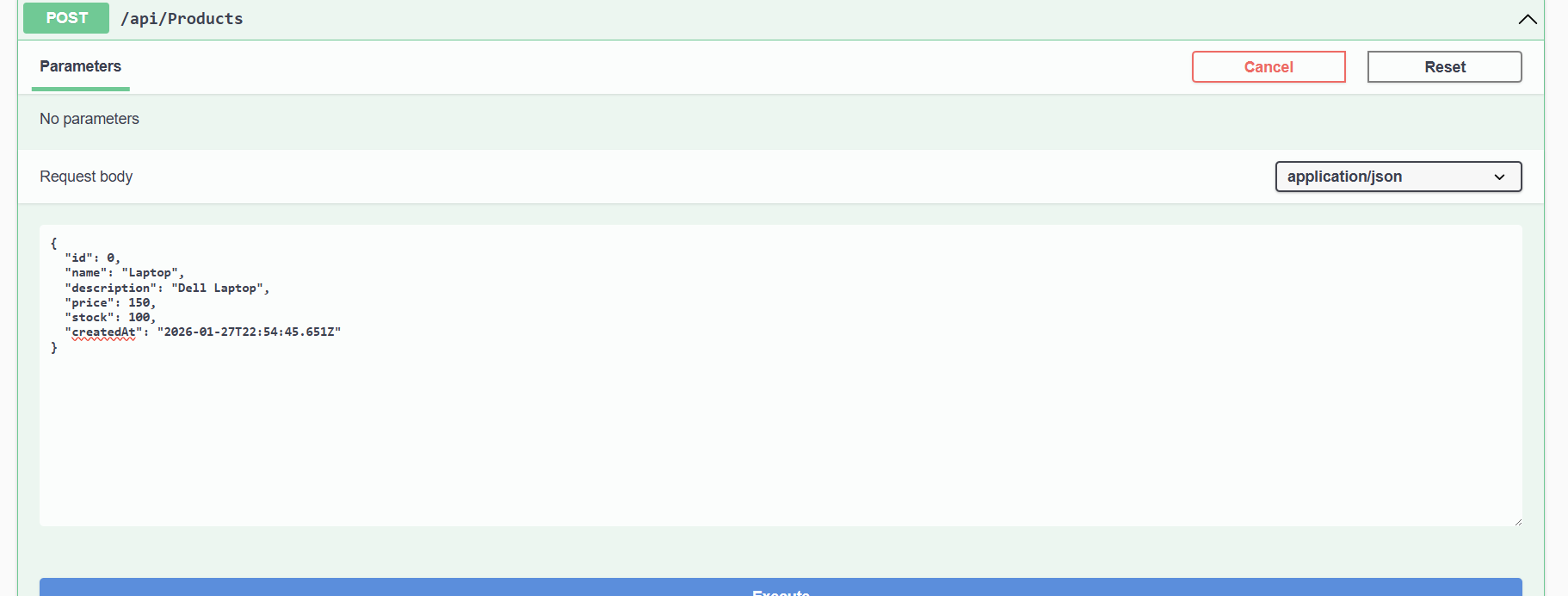
After running docker-compose, test the Product Service endpoints. Browse to http://localhost:5001/swagger to access the Swagger UI for Product Service. Now you can create a product with quantity in stock.
Swagger UI:
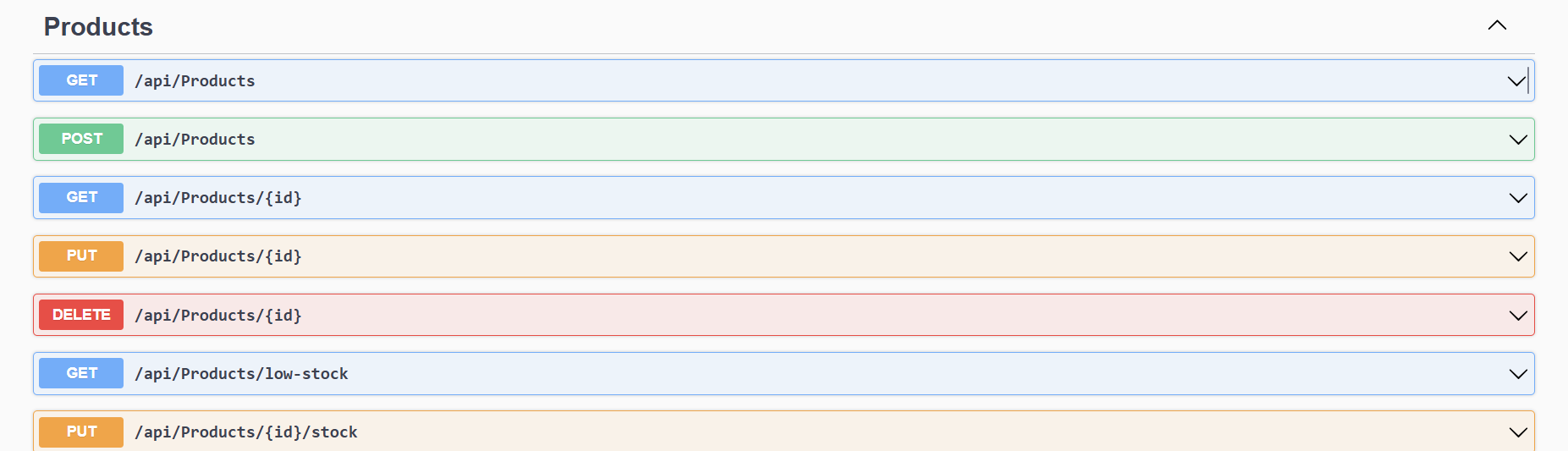
Create Product:
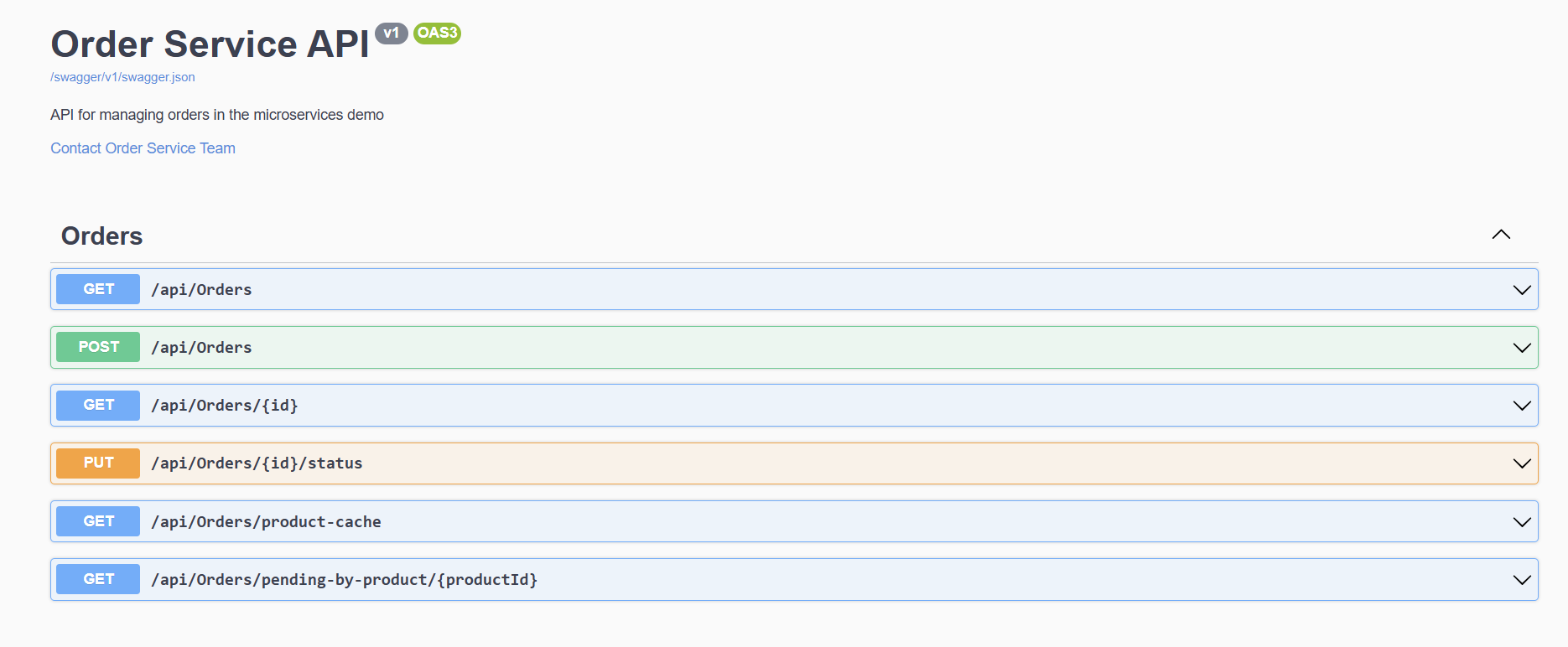
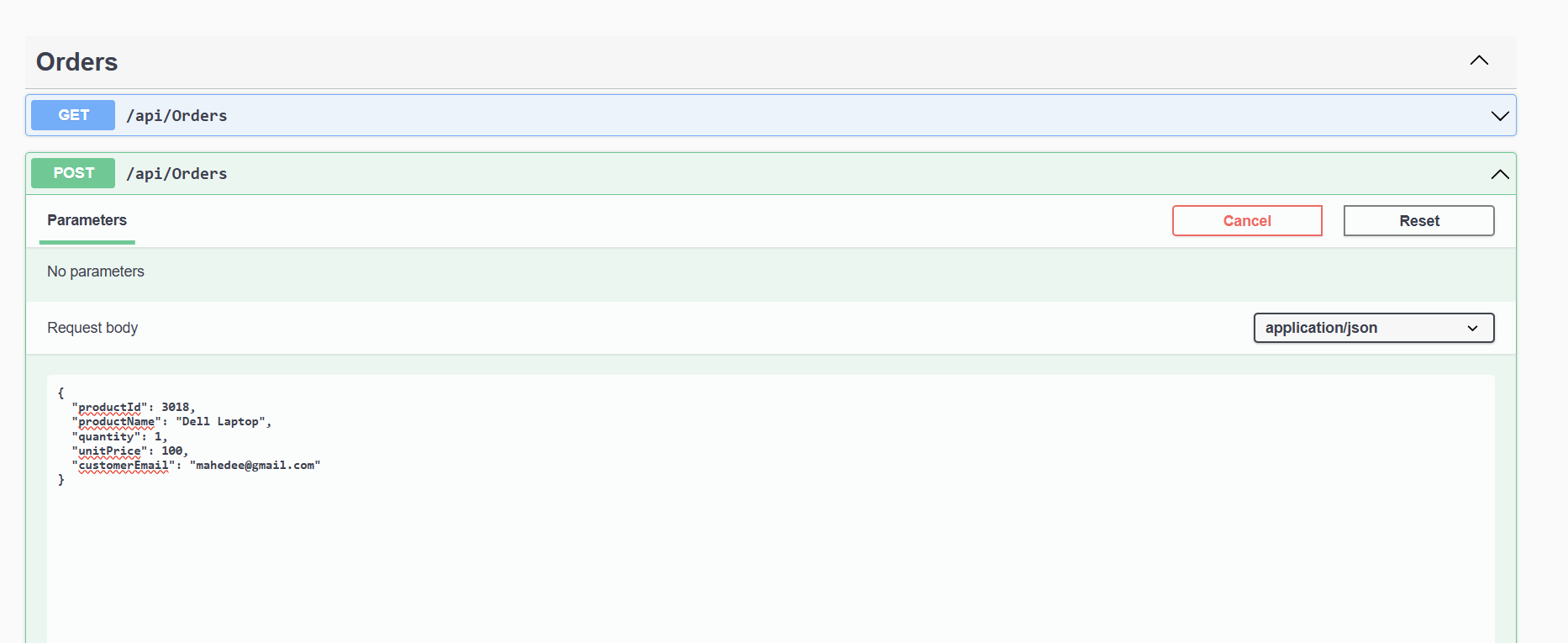
Test Order Service
Swagger UI:
Create Order:
Step 8: Monitoring Kafka Events
You can check if events are being published to Kafka topics:
# List topics
docker exec -it <kafka-container-id> kafka-topics --list --bootstrap-server localhost:9092

# Monitor events
docker exec -it <kafka-container-id> kafka-console-consumer --bootstrap-server localhost:9092 --topic ecommerce.ProductCreatedEvent --from-beginning
Key Benefits of This Architecture
- Loose Coupling: Services communicate through events, not direct API calls
- Scalability: Each service can be scaled independently
- Resilience: If one service fails, others continue to operate
- Technology Diversity: Each service can use different technologies
- Database Independence: Each service has its own database
- Event-Driven: Asynchronous processing improves performance
Troubleshooting
Common Issues:
- Services can’t connect to SQL Server: Make sure the connection string is correct and SQL Server container is running
- Kafka connection issues: Verify Kafka and Zookeeper containers are healthy
- Port conflicts: Check if ports 1433, 9092, 5001, 5002 are available
- Database creation fails: Ensure SQL Server is fully initialized before services start
Useful Docker Commands:
# View logs
docker-compose logs productservice
docker-compose logs orderservice

# Stop all services
docker-compose down

# Clean up volumes
docker-compose down -v

# Rebuild specific service
docker-compose build productservice
Next Steps
To extend this application, you could:
- Add API Gateway using Ocelot or YARP
- Implement Circuit Breaker pattern with Polly
- Add distributed tracing with OpenTelemetry
- Implement event sourcing
- Add authentication and authorization
- Create a web frontend with React or Angular
- Add monitoring with Prometheus and Grafana
Conclusion
In this tutorial, we’ve successfully built a microservices application using ASP.NET Core, Apache Kafka, and Docker. We created two independent services that communicate through events, each with its own database. This architecture provides the foundation for building scalable, maintainable applications.
The event-driven approach using Kafka ensures loose coupling between services while providing reliable message delivery. Docker containers make the application portable and easy to deploy across different environments.
This pattern can be extended to handle more complex business scenarios and larger-scale applications while maintaining the benefits of microservices architecture.
Please leave your comments and suggestions for further improvements! Share this tutorial if you found it helpful. Happy coding!

Comments