
Open-Close Principle in C# with Real-World Examples
Open Close Principle is an Object Oriented Design principle. It is first introduced by Betrand Meyer in 1988. He says “Software entities (Class, module, function etc.) should be open for extension, but closed for modification”. An entity is “Open for extension” means that its behavior can be extended to accommodate new demand. The entity is “closed for modification” means that the existing source code of the module is not changed or minimum change when making enhancement. It is clear that if a system cannot accommodate change easily, its life cycle will end fast.
Sometimes code changes introduce heavy risk. At the time of changing, you must ensure that changes will not break the system. Sometimes it takes huge regression testing. This risk can be minimized if no changes are made to existing code.
So, our intention should be writing code in such a way that new functionality should be added with minimum changes or not changes in the existing code. It should be done in a way to allow the adding of new functionality as new classes, keeping as much as possible existing code unchanged. The major advantages of “open close principle” is that it undergo changes and its value will be tremendous. It required almost no regression testing.
Let’s introduce open close principle with an example. Suppose, in our application, we need a “Area calculator” which calculate area of rectangle. However, in this occasion we just create a class AreaCalculator then there will be a method RectangleArea in this class which just calculates area of rectangle. It works fine. In the middle of the application development, we need to calculate area of Triangle and Circle. In this occasion, what should we do? We just add another two method TriangleArea and CircleArea and can do the job. But several problems will arise here – for each new shape you have to add new unit of code. Developer must have to know the logic to calculate area of new shape. Adding a new shape might effect in existing functionalities. So, it will take huge cost of regression testing. This is actually violate, open close principle.
We implement the same problem abide by open close principle by the following way. Here Rectangle, Triangle and Circle class inherit the Shape class and implement CalculateArea Method. In this way, if you need to calculate area of x shape just add a class of x and then implement shape and calculate area of x without modifying exiting code.
Implementation: The Right Way
Class diagram:
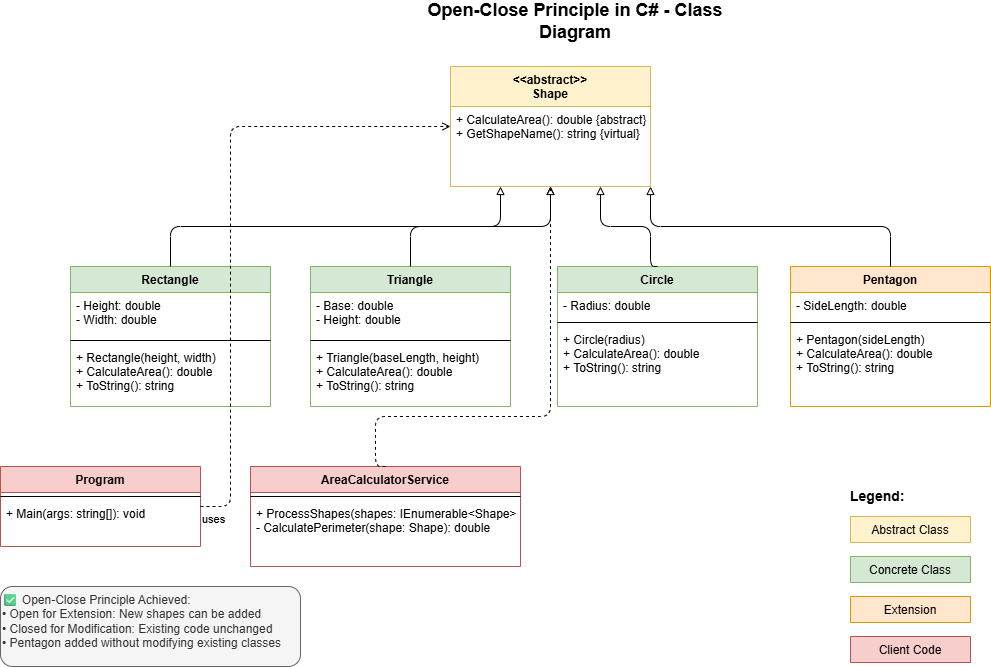
Benefits of This Design:
- ✅ Extensible: New shapes can be added without modifying existing code
- ✅ Maintainable: Each shape encapsulates its own area calculation logic
- ✅ Testable: Each shape can be tested independently
- ✅ Follows SRP: Each class has a single responsibility
Step-by-Step Implementation
Step 1: Create the Abstract Shape Base Class
using System;

namespace OCP
{
    /// <summary>
    /// Abstract base class for all geometric shapes
    /// Defines the contract that all shapes must follow
    /// </summary>
    public abstract class Shape
    {
        /// <summary>
        /// Calculate the area of the shape
        /// </summary>
        /// <returns>The area as a double value</returns>
        public abstract double CalculateArea();

        /// <summary>
        /// Get the name of the shape (optional: for display purposes)
        /// </summary>
        public virtual string GetShapeName() => this.GetType().Name;
    }
}
Step 2: Implement Rectangle Class
using System;

namespace OCP
{
    /// <summary>
    /// Represents a rectangle shape
    /// </summary>
    public class Rectangle : Shape
    {
        public double Height { get; private set; }
        public double Width { get; private set; }

        public Rectangle(double height, double width)
        {
            if (height <= 0 || width <= 0)
                throw new ArgumentException("Height and width must be positive values.");

            Height = height;
            Width = width;
        }

        public override double CalculateArea()
        {
            return Height * Width;
        }

        public override string ToString()
        {
            return $"Rectangle(Width: {Width}, Height: {Height})";
        }
    }
}
Step 3: Implement Triangle Class
using System;

namespace OCP
{
    /// <summary>
    /// Represents a triangle shape
    /// </summary>
    public class Triangle : Shape
    {
        public double Base { get; private set; }
        public double Height { get; private set; }

        public Triangle(double baseLength, double height)
        {
            if (baseLength <= 0 || height <= 0)
                throw new ArgumentException("Base and height must be positive values.");

            Base = baseLength;
            Height = height;
        }

        public override double CalculateArea()
        {
            return 0.5 * Base * Height;
        }

        public override string ToString()
        {
            return $"Triangle(Base: {Base}, Height: {Height})";
        }
    }
}
Step 4: Implement Circle Class
using System;

namespace OCP
{
    /// <summary>
    /// Represents a circle shape
    /// </summary>
    public class Circle : Shape
    {
        public double Radius { get; private set; }

        public Circle(double radius)
        {
            if (radius <= 0)
                throw new ArgumentException("Radius must be a positive value.");

            Radius = radius;
        }

        public override double CalculateArea()
        {
            return Math.PI * Radius * Radius;
        }

        public override string ToString()
        {
            return $"Circle(Radius: {Radius})";
        }
    }
}
Demonstrating Extensibility
Adding a New Shape Without Modifying Existing Code
Let’s add a Pentagon to demonstrate how easy it is to extend our system:
using System;

namespace OCP
{
    /// <summary>
    /// Represents a regular pentagon shape
    /// </summary>
    public class Pentagon : Shape
    {
        public double SideLength { get; private set; }

        public Pentagon(double sideLength)
        {
            if (sideLength <= 0)
                throw new ArgumentException("Side length must be a positive value.");

            SideLength = sideLength;
        }

        public override double CalculateArea()
        {
            // Formula for regular pentagon: (1/4) * √(25 + 10√5) * s²
            double coefficient = 0.25 * Math.Sqrt(25 + 10 * Math.Sqrt(5));
            return coefficient * SideLength * SideLength;
        }

        public override string ToString()
        {
            return $"Pentagon(SideLength: {SideLength})";
        }
    }
}
Step 5: Using the Shapes (Client Code)
using System;
using System.Collections.Generic;

namespace OCP
{
    public class Program
    {
        public static void Main(string[] args)
        {
            Console.WriteLine("=== Area Calculator using Open-Close Principle ===");
            Console.WriteLine();

            // Create a list of different shapes
            List<Shape> shapes = new List<Shape>
            {
                new Rectangle(20, 30),
                new Triangle(15, 25),
                new Circle(7),
                new Pentagon(10) // New shape added without modifying existing code!
            };

            // Calculate areas using polymorphism
            foreach (Shape shape in shapes)
            {
                try
                {
                    double area = shape.CalculateArea();
                    Console.WriteLine($"{shape} => Area: {area:F2}");
                }
                catch (Exception ex)
                {
                    Console.WriteLine($"Error calculating area for {shape.GetShapeName()}: {ex.Message}");
                }
            }

            Console.WriteLine();
            Console.WriteLine("Press any key to exit...");
            Console.ReadKey();
        }
    }
}
Sample Output
=== Area Calculator using Open-Close Principle ===

Rectangle(Width: 20, Height: 30) => Area: 600.00
Triangle(Base: 15, Height: 25) => Area: 187.50
Circle(Radius: 7) => Area: 153.94
Pentagon(SideLength: 10) => Area: 172.05

Press any key to exit...
Advanced Example: Area Calculator with Strategy Pattern
For even more flexibility, you can combine OCP with other patterns:
public class AreaCalculatorService
{
    public void ProcessShapes(IEnumerable<Shape> shapes)
    {
        foreach (var shape in shapes)
        {
            var area = shape.CalculateArea();
            var perimeter = CalculatePerimeter(shape); // Could be another extensible method

            Console.WriteLine($"{shape.GetShapeName()}: Area = {area:F2}, Perimeter = {perimeter:F2}");
        }
    }

    private double CalculatePerimeter(Shape shape)
    {
        // This could also follow OCP by having each shape implement IPerimeterCalculable
        return shape switch
        {
            Rectangle r => 2 * (r.Width + r.Height),
            Circle c => 2 * Math.PI * c.Radius,
            Triangle t => GetTrianglePerimeter(t), // Assuming we have this method
            Pentagon p => 5 * p.SideLength,
            _ => 0
        };
    }
}
Benefits Demonstrated
✅ What We Achieved
- Zero Modification: Adding Pentagon didn’t require changing any existing code
- Easy Testing: Each shape can be tested independently
- Clear Responsibilities: Each shape knows how to calculate its own area
- Type Safety: Compile-time checking ensures all shapes implement required methods
- Maintainability: Bug fixes in one shape don’t affect others
🔄 How to Add More Shapes
To add any new shape (Hexagon, Octagon, etc.):
- Create a new class inheriting from
Shape - Implement the
CalculateArea()method - Add it to your shapes collection
- That’s it! No existing code needs modification
Conclusion
The Open-Close Principle is fundamental to creating maintainable, extensible software. By designing our classes to be open for extension but closed for modification, we:
- Reduce risk when adding new features
- Minimize regression testing
- Create more modular, testable code
- Enable easier collaboration among team members
- Build systems that gracefully accommodate future requirements
Please share your thoughts and experiences with the Open-Close Principle in the comments below! Share in your networks if you found this guide helpful. Happy coding!

Comments