
Securing an ASP.NET Core Web API by Integrating Azure Key Vault
Azure Key Vault is a Microsoft Azure service for securely storing and managing sensitive information — secrets (passwords, connection strings, API keys), cryptographic keys, and certificates. Instead of hardcoding secrets in config files or source code, your application fetches them from the vault at runtime. Access is controlled via Azure RBAC, every read is audit-logged, and services running in Azure can authenticate using Managed Identity — with zero credentials stored anywhere.
What We’ll Build
We’ll create a simple e-commerce ASP.NET Core Web API called ECommerceApi that uses Azure Key Vault to securely manage all sensitive configuration at runtime — no secrets stored in code or config files.
The application includes:
- Auth — user registration and login with JWT bearer tokens
- Products — full CRUD for the product catalog
- Orders — order placement with stock management and email confirmation
- Config endpoint — development-only endpoint to verify all Key Vault secrets are loaded correctly
All sensitive values — the SQL Server connection string, JWT signing secret, and SMTP credentials — are stored as secrets in Azure Key Vault and loaded automatically into IConfiguration at startup using DefaultAzureCredential.
Prerequisites
Before we start, make sure you have:
- .NET 10 SDK
- Azure CLI
- SQL Server (local or Azure)
- Azure subscription
- Visual Studio 2026 or Visual Studio Code
Step 1: Create a Resource Group
- Go to https://portal.azure.com and sign in.
- In the top search bar, type Resource groups and click it.
- Click + Create.
- Fill in:
- Subscription → Select your subscription
- Resource group →
rg-ecommerce-dev - Region → Choose the region closest to you (e.g.,
West US)
- Click Review + create → Create.
Step 2: Create the Azure Key Vault
- In the Azure Portal search bar, type Key vaults and click it.
- Click + Create.
-
Fill in the Basics tab:
Field Value Subscription Your subscription Resource group rg-ecommerce-devKey vault name kv-ecommerce-dev-mh(must be globally unique)Region Same as your resource group Pricing tier Standard - Click Next: Access configuration.
- On the Access configuration tab:
- Permission model → Select Azure role-based access control (RBAC)
(RBAC is recommended over Vault Access Policies for better auditability)
- Permission model → Select Azure role-based access control (RBAC)
- Leave all other settings as default.
- Click Review + create → Create.
- Once deployed, click Go to resource.
- Copy the Vault URI from the Overview page — it looks like:
https://kv-ecommerce-dev-mh.vault.azure.net/You will paste this into
appsettings.json.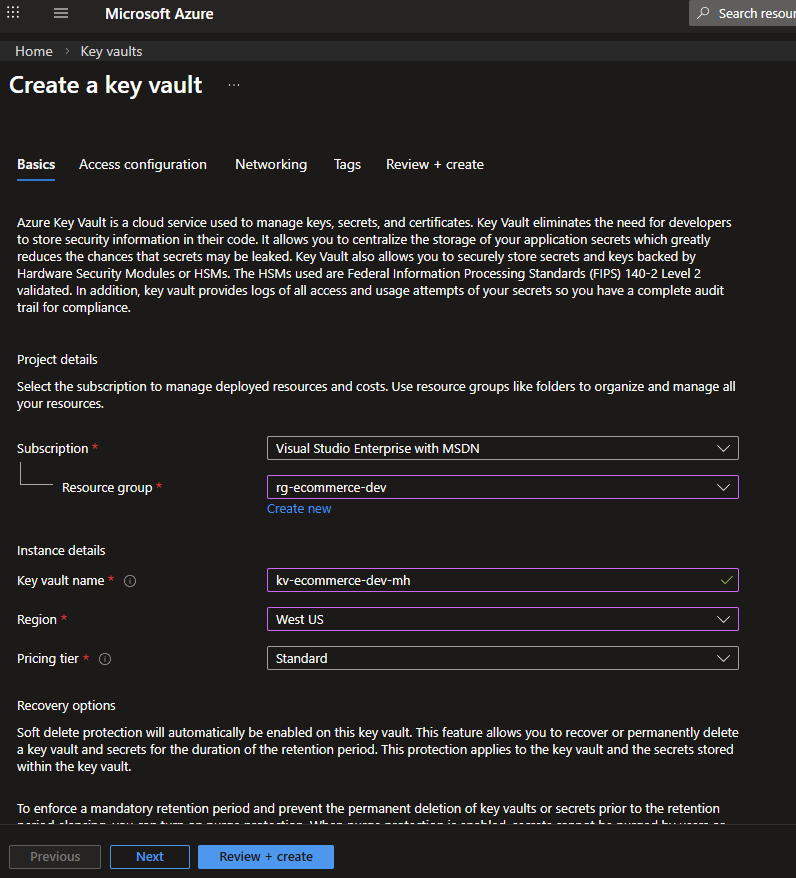 Fig : Creating the Azure Key Vault
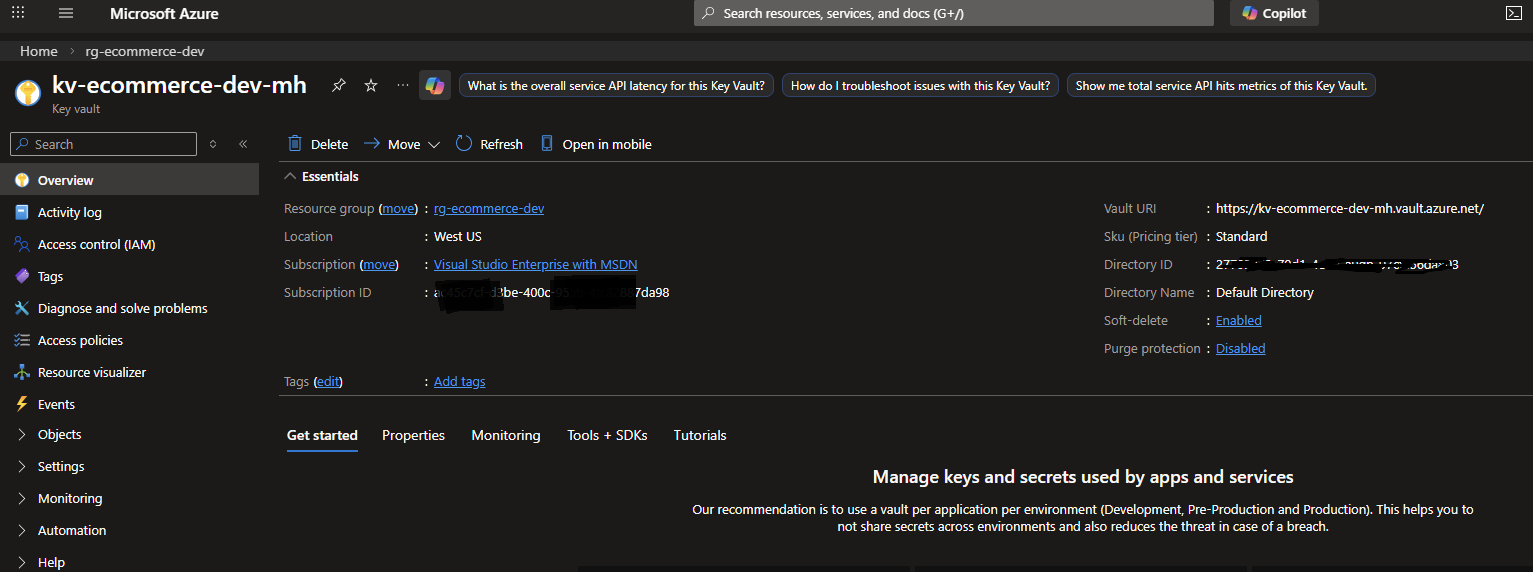 Fig : Copying the Vault URI
Step 3: Grant Access — Local Development
When running locally, DefaultAzureCredential uses your az login session.
You need to assign your own Azure AD account the Key Vault Secrets User role.
Log in to Azure CLI
az login
az account show   # verify the correct subscription is active
If you have multiple subscriptions:
az account set --subscription "<your-subscription-id>"
Assign yourself the required roles
You need two roles assigned to your own Azure AD account:
| Role | Purpose |
|---|---|
| Key Vault Secrets Officer | Create, update, delete secrets via the Portal or CLI |
| Key Vault Secrets User | Read secrets at runtime (also used by the app’s Managed Identity) |
Important: Without Key Vault Secrets Officer, you will get a
Forbidden / RBACerror when trying to create secrets in the Portal. This is separate from the runtime read access the app needs.
Steps (repeat for each role):
- In the Azure Portal, navigate to your Key Vault (
kv-ecommerce-dev-mh). - Click Access control (IAM) in the left menu.
- Click + Add → Add role assignment.
- On the Role tab:
- Search for and select the role (Key Vault Secrets Officer first, then repeat for Key Vault Secrets User)
- Click Next
- On the Members tab:
- Assign access to →
User, group, or service principal - Click + Select members
- Search for your own Azure AD email/name → Select it
- Click Select → Next → Review + assign
- Assign access to →
- Wait 2–5 minutes for the role to propagate before creating secrets.
Or assign both roles at once via CLI:
$myObjectId = az ad signed-in-user show --query id -o tsv
$scope = "/subscriptions/<your-subscription-id>/resourceGroups/rg-ecommerce-dev/providers/Microsoft.KeyVault/vaults/kv-ecommerce-dev-mh"

az role assignment create --role "Key Vault Secrets Officer" --assignee $myObjectId --scope $scope
az role assignment create --role "Key Vault Secrets User"   --assignee $myObjectId --scope $scope
After this,
DefaultAzureCredentialon your local machine (authenticated viaaz login) will be able to read secrets, and you can manage secrets via the Portal.
Step 4: Add Secrets to Key Vault
Naming convention: Azure Key Vault does not support
:(colon) in secret names.
TheAzure.Extensions.AspNetCore.Configuration.Secretspackage translates--(double dash) to:inIConfiguration.
SoSqlServer--ConnectionStringin Key Vault becomesSqlServer:ConnectionStringin your app.
Step-by-step for each secret:
- In your Key Vault resource, click Objects → Secrets in the left menu.
- Click + Generate/Import.
- Set:
- Upload options →
Manual - Name → (see table below)
- Secret value → (see table below)
- Upload options →
- Click Create.
Repeat for all 8 secrets:
| Secret Name (Key Vault) | Secret Value | Maps to (IConfiguration key) |
|---|---|---|
SqlServer--ConnectionString |
Server=<your-azure-sql-server>.database.windows.net;Database=ECommerceDb;User Id=<user>;Password=<pass>;TrustServerCertificate=False;Encrypt=True; |
SqlServer:ConnectionString |
Jwt--SigningSecret |
A random string, minimum 32 characters (e.g., generate with openssl rand -base64 32) |
Jwt:SigningSecret |
Jwt--Issuer |
ECommerceApi |
Jwt:Issuer |
Jwt--Audience |
ECommerceApiUsers |
Jwt:Audience |
Smtp--Host |
smtp.sendgrid.net (or your SMTP provider) |
Smtp:Host |
Smtp--Port |
587 |
Smtp:Port |
Smtp--Username |
apikey (SendGrid) or your username or email address |
Smtp:Username |
Smtp--Password |
Your SMTP password / SendGrid API key | Smtp:Password |
Smtp--FromEmail |
noreply@yourdomain.com |
Smtp:FromEmail |
Smtp--FromName |
ECommerce Store |
Smtp:FromName |
Tip: For local development / testing SMTP, use Mailtrap — free sandbox that catches all emails without sending them.
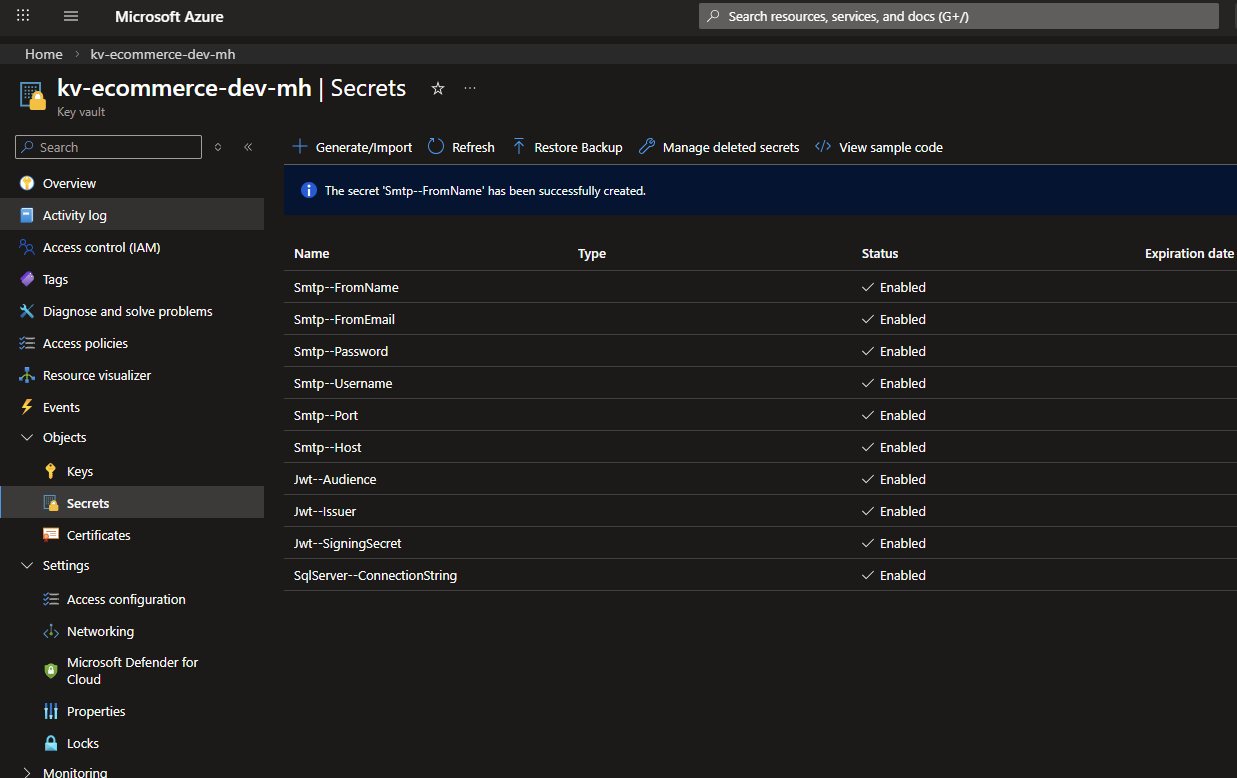 Fig : Adding a secret to Azure Key Vault
Step 5: Build the ECommerceApi Application using asp.net core web api
This section walks through creating the complete ECommerceApi project from scratch. Follow each step in order to build the same application.
Step 5.1 — Scaffold the Project
mkdir src
cd src
dotnet new webapi -n ECommerceApi
cd ECommerceApi
Delete the generated WeatherForecast.cs and Controllers/WeatherForecastController.cs — they are not needed.
Step 5.2 — Add NuGet Packages
dotnet add package Azure.Identity
dotnet add package Azure.Extensions.AspNetCore.Configuration.Secrets
dotnet add package BCrypt.Net-Next
dotnet add package MailKit
dotnet add package Microsoft.AspNetCore.Authentication.JwtBearer
dotnet add package Microsoft.EntityFrameworkCore.SqlServer
dotnet add package Microsoft.EntityFrameworkCore.Tools
dotnet add package Microsoft.OpenApi
dotnet add package Swashbuckle.AspNetCore
Step 5.3 — Create the Models
Create a Models/ folder and add the following four files.
Models/User.cs
namespace ECommerceApi.Models;

public class User
{
    public int Id { get; set; }
    public string Name { get; set; } = string.Empty;
    public string Email { get; set; } = string.Empty;
    public string PasswordHash { get; set; } = string.Empty;
    public string Role { get; set; } = "Customer";
    public DateTime CreatedAt { get; set; } = DateTime.UtcNow;

    public ICollection<Order> Orders { get; set; } = new List<Order>();
}
Models/Product.cs
namespace ECommerceApi.Models;

public class Product
{
    public int Id { get; set; }
    public string Name { get; set; } = string.Empty;
    public string Description { get; set; } = string.Empty;
    public decimal Price { get; set; }
    public int Stock { get; set; }
    public DateTime CreatedAt { get; set; } = DateTime.UtcNow;

    public ICollection<OrderItem> OrderItems { get; set; } = new List<OrderItem>();
}
Models/Order.cs
namespace ECommerceApi.Models;

public class Order
{
    public int Id { get; set; }
    public int UserId { get; set; }
    public User User { get; set; } = null!;
    public string Status { get; set; } = "Pending";
    public decimal TotalAmount { get; set; }
    public DateTime CreatedAt { get; set; } = DateTime.UtcNow;

    public ICollection<OrderItem> Items { get; set; } = new List<OrderItem>();
}
Models/OrderItem.cs
namespace ECommerceApi.Models;

public class OrderItem
{
    public int Id { get; set; }
    public int OrderId { get; set; }
    public Order Order { get; set; } = null!;
    public int ProductId { get; set; }
    public Product Product { get; set; } = null!;
    public int Quantity { get; set; }
    public decimal UnitPrice { get; set; }
}
Step 5.4 — Create the Database Context
Create Data/AppDbContext.cs:
using ECommerceApi.Models;
using Microsoft.EntityFrameworkCore;

namespace ECommerceApi.Data;

public class AppDbContext : DbContext
{
    public AppDbContext(DbContextOptions<AppDbContext> options) : base(options) { }

    public DbSet<User> Users => Set<User>();
    public DbSet<Product> Products => Set<Product>();
    public DbSet<Order> Orders => Set<Order>();
    public DbSet<OrderItem> OrderItems => Set<OrderItem>();

    protected override void OnModelCreating(ModelBuilder modelBuilder)
    {
        modelBuilder.Entity<User>()
            .HasIndex(u => u.Email)
            .IsUnique();

        modelBuilder.Entity<Product>().Property(p => p.Price).HasPrecision(18, 2);
        modelBuilder.Entity<Order>().Property(o => o.TotalAmount).HasPrecision(18, 2);
        modelBuilder.Entity<OrderItem>().Property(oi => oi.UnitPrice).HasPrecision(18, 2);

        modelBuilder.Entity<OrderItem>()
            .HasOne(oi => oi.Order).WithMany(o => o.Items)
            .HasForeignKey(oi => oi.OrderId).OnDelete(DeleteBehavior.Cascade);

        modelBuilder.Entity<OrderItem>()
            .HasOne(oi => oi.Product).WithMany(p => p.OrderItems)
            .HasForeignKey(oi => oi.ProductId).OnDelete(DeleteBehavior.Restrict);
    }
}
Step 5.5 — Create the DTOs
Create three subfolders: DTOs/Auth/, DTOs/Products/, DTOs/Orders/.
DTOs/Auth/RegisterDto.cs
using System.ComponentModel.DataAnnotations;

namespace ECommerceApi.DTOs.Auth;

public class RegisterDto
{
    [Required] public string Name { get; set; } = string.Empty;
    [Required, EmailAddress] public string Email { get; set; } = string.Empty;
    [Required, MinLength(6)] public string Password { get; set; } = string.Empty;
}
DTOs/Auth/LoginDto.cs
using System.ComponentModel.DataAnnotations;

namespace ECommerceApi.DTOs.Auth;

public class LoginDto
{
    [Required, EmailAddress] public string Email { get; set; } = string.Empty;
    [Required] public string Password { get; set; } = string.Empty;
}
DTOs/Auth/AuthResponseDto.cs
namespace ECommerceApi.DTOs.Auth;

public class AuthResponseDto
{
    public string Token { get; set; } = string.Empty;
    public string Email { get; set; } = string.Empty;
    public string Name { get; set; } = string.Empty;
    public string Role { get; set; } = string.Empty;
}
DTOs/Products/ProductDto.cs
namespace ECommerceApi.DTOs.Products;

public class ProductDto
{
    public int Id { get; set; }
    public string Name { get; set; } = string.Empty;
    public string Description { get; set; } = string.Empty;
    public decimal Price { get; set; }
    public int Stock { get; set; }
}
DTOs/Products/CreateProductDto.cs
using System.ComponentModel.DataAnnotations;

namespace ECommerceApi.DTOs.Products;

public class CreateProductDto
{
    [Required] public string Name { get; set; } = string.Empty;
    public string Description { get; set; } = string.Empty;
    [Range(0.01, double.MaxValue)] public decimal Price { get; set; }
    [Range(0, int.MaxValue)] public int Stock { get; set; }
}
DTOs/Orders/CreateOrderDto.cs
using System.ComponentModel.DataAnnotations;

namespace ECommerceApi.DTOs.Orders;

public class CreateOrderDto
{
    [Required, MinLength(1)] public List<OrderItemRequestDto> Items { get; set; } = new();
}

public class OrderItemRequestDto
{
    [Required] public int ProductId { get; set; }
    [Range(1, int.MaxValue)] public int Quantity { get; set; }
}
DTOs/Orders/OrderResponseDto.cs
namespace ECommerceApi.DTOs.Orders;

public class OrderResponseDto
{
    public int Id { get; set; }
    public string Status { get; set; } = string.Empty;
    public decimal TotalAmount { get; set; }
    public DateTime CreatedAt { get; set; }
    public List<OrderItemResponseDto> Items { get; set; } = new();
}

public class OrderItemResponseDto
{
    public int ProductId { get; set; }
    public string ProductName { get; set; } = string.Empty;
    public int Quantity { get; set; }
    public decimal UnitPrice { get; set; }
    public decimal Subtotal => Quantity * UnitPrice;
}
DTOs/Orders/UpdateOrderStatusDto.cs
using System.ComponentModel.DataAnnotations;

namespace ECommerceApi.DTOs.Orders;

public class UpdateOrderStatusDto
{
    [Required] public string Status { get; set; } = string.Empty;
}
Step 5.6 — Create the Services
Services/ITokenService.cs
using ECommerceApi.Models;

namespace ECommerceApi.Services;

public interface ITokenService
{
    string CreateToken(User user);
}
Services/TokenService.cs
using ECommerceApi.Models;
using Microsoft.IdentityModel.Tokens;
using System.IdentityModel.Tokens.Jwt;
using System.Security.Claims;
using System.Text;

namespace ECommerceApi.Services;

public class TokenService : ITokenService
{
    private readonly IConfiguration _config;
    public TokenService(IConfiguration config) => _config = config;

    public string CreateToken(User user)
    {
        var secret = _config["Jwt:SigningSecret"]
            ?? throw new InvalidOperationException("JWT signing secret not configured.");

        var key = new SymmetricSecurityKey(Encoding.UTF8.GetBytes(secret));
        var creds = new SigningCredentials(key, SecurityAlgorithms.HmacSha256);

        var claims = new[]
        {
            new Claim(ClaimTypes.NameIdentifier, user.Id.ToString()),
            new Claim(ClaimTypes.Email, user.Email),
            new Claim(ClaimTypes.Name, user.Name),
            new Claim(ClaimTypes.Role, user.Role)
        };

        var token = new JwtSecurityToken(
            issuer: _config["Jwt:Issuer"],
            audience: _config["Jwt:Audience"],
            claims: claims,
            expires: DateTime.UtcNow.AddHours(24),
            signingCredentials: creds);

        return new JwtSecurityTokenHandler().WriteToken(token);
    }
}
Services/IEmailService.cs
namespace ECommerceApi.Services;

public interface IEmailService
{
    Task SendWelcomeEmailAsync(string toEmail, string name);
    Task SendOrderConfirmationAsync(string toEmail, string name, int orderId, decimal total);
}
Services/EmailService.cs
using MailKit.Net.Smtp;
using MailKit.Security;
using MimeKit;

namespace ECommerceApi.Services;

public class EmailService : IEmailService
{
    private readonly IConfiguration _config;
    private readonly ILogger<EmailService> _logger;

    public EmailService(IConfiguration config, ILogger<EmailService> logger)
    {
        _config = config;
        _logger = logger;
    }

    public async Task SendWelcomeEmailAsync(string toEmail, string name) =>
        await SendEmailAsync(toEmail, name, "Welcome to ECommerce Store!",
            $"<h2>Welcome, {name}!</h2><p>Thank you for registering at our store.</p>");

    public async Task SendOrderConfirmationAsync(string toEmail, string name, int orderId, decimal total) =>
        await SendEmailAsync(toEmail, name, $"Order #{orderId} Confirmed",
            $"<h2>Order Confirmed, {name}!</h2><p>Order <strong>#{orderId}</strong> — Total: <strong>${total:F2}</strong></p>");

    private async Task SendEmailAsync(string toEmail, string toName, string subject, string htmlBody)
    {
        var host     = _config["Smtp:Host"]     ?? throw new InvalidOperationException("SMTP host not configured.");
        var port     = int.Parse(_config["Smtp:Port"] ?? "587");
        var username = _config["Smtp:Username"] ?? throw new InvalidOperationException("SMTP username not configured.");
        var password = _config["Smtp:Password"] ?? throw new InvalidOperationException("SMTP password not configured.");
        var fromEmail = _config["Smtp:FromEmail"] ?? username;
        var fromName  = _config["Smtp:FromName"]  ?? "ECommerce Store";

        var message = new MimeMessage();
        message.From.Add(new MailboxAddress(fromName, fromEmail));
        message.To.Add(new MailboxAddress(toName, toEmail));
        message.Subject = subject;
        message.Body = new TextPart("html") { Text = htmlBody };

        using var client = new SmtpClient();
        await client.ConnectAsync(host, port, SecureSocketOptions.StartTls);
        await client.AuthenticateAsync(username, password);
        await client.SendAsync(message);
        await client.DisconnectAsync(true);

        _logger.LogInformation("Email sent to {Email} — Subject: {Subject}", toEmail, subject);
    }
}
Step 5.7 — Create the Controllers
Controllers/AuthController.cs
using ECommerceApi.Data;
using ECommerceApi.DTOs.Auth;
using ECommerceApi.Models;
using ECommerceApi.Services;
using Microsoft.AspNetCore.Mvc;
using Microsoft.EntityFrameworkCore;

namespace ECommerceApi.Controllers;

[ApiController]
[Route("api/[controller]")]
public class AuthController : ControllerBase
{
    private readonly AppDbContext _db;
    private readonly ITokenService _tokenService;
    private readonly IEmailService _emailService;
    private readonly ILogger<AuthController> _logger;

    public AuthController(AppDbContext db, ITokenService tokenService,
        IEmailService emailService, ILogger<AuthController> logger)
    {
        _db = db; _tokenService = tokenService;
        _emailService = emailService; _logger = logger;
    }

    [HttpPost("register")]
    public async Task<ActionResult<AuthResponseDto>> Register(RegisterDto dto)
    {
        if (await _db.Users.AnyAsync(u => u.Email == dto.Email))
            return Conflict(new { message = "Email is already registered." });

        var user = new User
        {
            Name = dto.Name,
            Email = dto.Email,
            PasswordHash = BCrypt.Net.BCrypt.HashPassword(dto.Password)
        };
        _db.Users.Add(user);
        await _db.SaveChangesAsync();

        _ = _emailService.SendWelcomeEmailAsync(user.Email, user.Name)
            .ContinueWith(t => _logger.LogWarning(t.Exception,
                "Welcome email failed for {Email}", user.Email),
                TaskContinuationOptions.OnlyOnFaulted);

        var token = _tokenService.CreateToken(user);
        return Ok(new AuthResponseDto { Token = token, Email = user.Email, Name = user.Name, Role = user.Role });
    }

    [HttpPost("login")]
    public async Task<ActionResult<AuthResponseDto>> Login(LoginDto dto)
    {
        var user = await _db.Users.SingleOrDefaultAsync(u => u.Email == dto.Email);
        if (user is null || !BCrypt.Net.BCrypt.Verify(dto.Password, user.PasswordHash))
            return Unauthorized(new { message = "Invalid email or password." });

        var token = _tokenService.CreateToken(user);
        return Ok(new AuthResponseDto { Token = token, Email = user.Email, Name = user.Name, Role = user.Role });
    }
}
Controllers/ProductsController.cs
using ECommerceApi.Data;
using ECommerceApi.DTOs.Products;
using ECommerceApi.Models;
using Microsoft.AspNetCore.Mvc;
using Microsoft.EntityFrameworkCore;

namespace ECommerceApi.Controllers;

[ApiController]
[Route("api/[controller]")]
public class ProductsController : ControllerBase
{
    private readonly AppDbContext _db;
    public ProductsController(AppDbContext db) => _db = db;

    [HttpGet]
    public async Task<ActionResult<List<ProductDto>>> GetAll() =>
        Ok(await _db.Products.Select(p => new ProductDto
        {
            Id = p.Id, Name = p.Name, Description = p.Description,
            Price = p.Price, Stock = p.Stock
        }).ToListAsync());

    [HttpGet("{id}")]
    public async Task<ActionResult<ProductDto>> GetById(int id)
    {
        var p = await _db.Products.FindAsync(id);
        if (p is null) return NotFound();
        return Ok(new ProductDto { Id = p.Id, Name = p.Name, Description = p.Description, Price = p.Price, Stock = p.Stock });
    }

    [HttpPost]
    public async Task<ActionResult<ProductDto>> Create(CreateProductDto dto)
    {
        var product = new Product { Name = dto.Name, Description = dto.Description, Price = dto.Price, Stock = dto.Stock };
        _db.Products.Add(product);
        await _db.SaveChangesAsync();
        var result = new ProductDto { Id = product.Id, Name = product.Name, Description = product.Description, Price = product.Price, Stock = product.Stock };
        return CreatedAtAction(nameof(GetById), new { id = product.Id }, result);
    }

    [HttpPut("{id}")]
    public async Task<IActionResult> Update(int id, CreateProductDto dto)
    {
        var product = await _db.Products.FindAsync(id);
        if (product is null) return NotFound();
        product.Name = dto.Name; product.Description = dto.Description;
        product.Price = dto.Price; product.Stock = dto.Stock;
        await _db.SaveChangesAsync();
        return NoContent();
    }

    [HttpDelete("{id}")]
    public async Task<IActionResult> Delete(int id)
    {
        var product = await _db.Products.FindAsync(id);
        if (product is null) return NotFound();
        _db.Products.Remove(product);
        await _db.SaveChangesAsync();
        return NoContent();
    }
}
Controllers/OrdersController.cs
using ECommerceApi.Data;
using ECommerceApi.DTOs.Orders;
using ECommerceApi.Models;
using ECommerceApi.Services;
using Microsoft.AspNetCore.Mvc;
using Microsoft.EntityFrameworkCore;
using System.Security.Claims;

namespace ECommerceApi.Controllers;

[ApiController]
[Route("api/[controller]")]
public class OrdersController : ControllerBase
{
    private readonly AppDbContext _db;
    private readonly IEmailService _emailService;
    private readonly ILogger<OrdersController> _logger;

    public OrdersController(AppDbContext db, IEmailService emailService, ILogger<OrdersController> logger)
    {
        _db = db; _emailService = emailService; _logger = logger;
    }

    [HttpPost]
    public async Task<ActionResult<OrderResponseDto>> CreateOrder(CreateOrderDto dto)
    {
        var userId = int.Parse(User.FindFirstValue(ClaimTypes.NameIdentifier)!);
        var user = await _db.Users.FindAsync(userId);
        if (user is null) return Unauthorized();

        var productIds = dto.Items.Select(i => i.ProductId).Distinct().ToList();
        var products = await _db.Products.Where(p => productIds.Contains(p.Id)).ToDictionaryAsync(p => p.Id);

        var order = new Order { UserId = userId };
        foreach (var item in dto.Items)
        {
            if (!products.TryGetValue(item.ProductId, out var product))
                return BadRequest(new { message = $"Product ID {item.ProductId} not found." });
            if (product.Stock < item.Quantity)
                return BadRequest(new { message = $"Insufficient stock for '{product.Name}'." });

            product.Stock -= item.Quantity;
            order.Items.Add(new OrderItem { ProductId = product.Id, Quantity = item.Quantity, UnitPrice = product.Price });
            order.TotalAmount += item.Quantity * product.Price;
        }

        _db.Orders.Add(order);
        await _db.SaveChangesAsync();

        _ = _emailService.SendOrderConfirmationAsync(user.Email, user.Name, order.Id, order.TotalAmount)
            .ContinueWith(t => _logger.LogWarning(t.Exception,
                "Order confirmation email failed for order #{OrderId}", order.Id),
                TaskContinuationOptions.OnlyOnFaulted);

        return CreatedAtAction(nameof(GetById), new { id = order.Id }, MapToDto(order, products));
    }

    [HttpGet]
    public async Task<ActionResult<List<OrderResponseDto>>> GetMyOrders()
    {
        var userId = int.Parse(User.FindFirstValue(ClaimTypes.NameIdentifier)!);
        var orders = await _db.Orders
            .Include(o => o.Items).ThenInclude(i => i.Product)
            .Where(o => o.UserId == userId)
            .OrderByDescending(o => o.CreatedAt)
            .ToListAsync();
        return Ok(orders.Select(o => MapToDto(o)));
    }

    [HttpGet("{id}")]
    public async Task<ActionResult<OrderResponseDto>> GetById(int id)
    {
        var userId = int.Parse(User.FindFirstValue(ClaimTypes.NameIdentifier)!);
        var isAdmin = User.IsInRole("Admin");
        var order = await _db.Orders.Include(o => o.Items).ThenInclude(i => i.Product)
            .FirstOrDefaultAsync(o => o.Id == id);
        if (order is null) return NotFound();
        if (!isAdmin && order.UserId != userId) return Forbid();
        return Ok(MapToDto(order));
    }

    [HttpPatch("{id}/status")]
    public async Task<IActionResult> UpdateStatus(int id, UpdateOrderStatusDto dto)
    {
        var order = await _db.Orders.FindAsync(id);
        if (order is null) return NotFound();
        order.Status = dto.Status;
        await _db.SaveChangesAsync();
        return NoContent();
    }

    private static OrderResponseDto MapToDto(Order order, Dictionary<int, Product>? productMap = null) =>
        new()
        {
            Id = order.Id, Status = order.Status,
            TotalAmount = order.TotalAmount, CreatedAt = order.CreatedAt,
            Items = order.Items.Select(i => new OrderItemResponseDto
            {
                ProductId = i.ProductId,
                ProductName = productMap != null
                    ? (productMap.TryGetValue(i.ProductId, out var p) ? p.Name : string.Empty)
                    : i.Product?.Name ?? string.Empty,
                Quantity = i.Quantity, UnitPrice = i.UnitPrice
            }).ToList()
        };
}
Step 5.8 - Create the ConfigController to verify that secrets are loaded correctly from Azure Key Vault.
This controller is for development/testing purposes only and should not be included in production.
Controllers/ConfigController.cs
using Microsoft.AspNetCore.Mvc;

namespace ECommerceApi.Controllers;

/// <summary>
/// Development-only endpoint to verify Azure Key Vault secrets are loaded correctly.
/// Remove or restrict this controller before deploying to production.
/// </summary>
[ApiController]
[Route("api/[controller]")]
public class ConfigController : ControllerBase
{
    private readonly IConfiguration _config;
    private readonly IWebHostEnvironment _env;

    // Keys expected to be loaded from Azure Key Vault
    private static readonly string[] SecretKeys =
    [
        "SqlServer:ConnectionString",
        "Jwt:SigningSecret",
        "Jwt:Issuer",
        "Jwt:Audience",
        "Smtp:Host",
        "Smtp:Port",
        "Smtp:Username",
        "Smtp:Password",
        "Smtp:FromEmail",
        "Smtp:FromName"
    ];

    // Keys whose values should be masked for safety
    private static readonly string[] SensitiveKeys =
    [
        "SqlServer:ConnectionString",
        "Jwt:SigningSecret",
        "Smtp:Password"
    ];

    public ConfigController(IConfiguration config, IWebHostEnvironment env)
    {
        _config = config;
        _env = env;
    }

    /// <summary>
    /// Returns all Azure Key Vault secret keys and their values.
    /// Sensitive values (passwords, secrets) are partially masked.
    /// Only available in Development environment.
    /// </summary>
    [HttpGet("keyvault-secrets")]
    public IActionResult GetKeyVaultSecrets()
    {
        if (!_env.IsDevelopment())
            return NotFound();

        var result = SecretKeys.Select(key =>
        {
            var value = _config[key];
            var isSensitive = SensitiveKeys.Contains(key);

            return new
            {
                Key = key,
                Value = value is null
                    ? "(not set)"
                    : isSensitive
                        ? MaskValue(value)
                        : value,
                IsSet = value is not null
            };
        });

        return Ok(result);
    }

    private static string MaskValue(string value)
    {
        if (value.Length <= 6)
            return new string('*', value.Length);

        return value[..3] + new string('*', value.Length - 6) + value[^3..];
    }
}
Step 5.9 — Configure appsettings.json to include the Key Vault URI and load secrets at runtime.
Open appsettings.json and replace its contents with:
{
  "KeyVaultUri": "https://kv-ecommerce-dev-mh.vault.azure.net/",
  "Logging": {
    "LogLevel": {
      "Default": "Information",
      "Microsoft.AspNetCore": "Warning"
    }
  },
  "AllowedHosts": "*"
}
Step 5.10 — Configure Program.cs
Replace the generated Program.cs with the following code. Here keyVaultUri is read from appsettings.json and the Azure.Extensions.AspNetCore.Configuration.Secrets package is used to load all secrets from Key Vault into IConfiguration at startup.
using Azure.Identity;
using ECommerceApi.Data;
using ECommerceApi.Services;
using Microsoft.AspNetCore.Authentication.JwtBearer;
using Microsoft.EntityFrameworkCore;
using Microsoft.IdentityModel.Tokens;
using Microsoft.OpenApi;
using System.Text;

var builder = WebApplication.CreateBuilder(args);

// Azure Key Vault — loads all secrets into IConfiguration at startup
var keyVaultUri = builder.Configuration["KeyVaultUri"];
if (!string.IsNullOrWhiteSpace(keyVaultUri))
{
    builder.Configuration.AddAzureKeyVault(
        new Uri(keyVaultUri),
        new DefaultAzureCredential());
}

// Database (connection string comes from Key Vault secret: SqlServer--ConnectionString)
builder.Services.AddDbContext<AppDbContext>(options =>
    options.UseSqlServer(
        builder.Configuration["SqlServer:ConnectionString"]
            ?? throw new InvalidOperationException("SqlServer:ConnectionString is not configured.")));

// JWT Authentication (signing secret comes from Key Vault secret: Jwt--SigningSecret)
var jwtSecret = builder.Configuration["Jwt:SigningSecret"]
    ?? throw new InvalidOperationException("Jwt:SigningSecret is not configured.");

builder.Services.AddAuthentication(JwtBearerDefaults.AuthenticationScheme)
    .AddJwtBearer(options =>
    {
        options.TokenValidationParameters = new TokenValidationParameters
        {
            ValidateIssuer = true,
            ValidateAudience = true,
            ValidateLifetime = true,
            ValidateIssuerSigningKey = true,
            ValidIssuer = builder.Configuration["Jwt:Issuer"],
            ValidAudience = builder.Configuration["Jwt:Audience"],
            IssuerSigningKey = new SymmetricSecurityKey(Encoding.UTF8.GetBytes(jwtSecret))
        };
    });

builder.Services.AddAuthorization();
builder.Services.AddScoped<ITokenService, TokenService>();
builder.Services.AddScoped<IEmailService, EmailService>();
builder.Services.AddControllers();
builder.Services.AddEndpointsApiExplorer();
builder.Services.AddSwaggerGen(c =>
{
    c.SwaggerDoc("v1", new OpenApiInfo { Title = "ECommerce API", Version = "v1" });
    c.AddSecurityDefinition("Bearer", new OpenApiSecurityScheme
    {
        Name = "Authorization",
        Type = SecuritySchemeType.ApiKey,
        In = ParameterLocation.Header,
        Description = "Enter: Bearer {your token}"
    });
    c.AddSecurityRequirement(_ => new OpenApiSecurityRequirement
    {
        { new OpenApiSecuritySchemeReference("Bearer"), new List<string>() }
    });
});

var app = builder.Build();

if (app.Environment.IsDevelopment())
{
    app.UseSwagger();
    app.UseSwaggerUI(c => c.SwaggerEndpoint("/swagger/v1/swagger.json", "ECommerce API v1"));
}

app.UseHttpsRedirection();
app.UseAuthentication();
app.UseAuthorization();
app.MapControllers();

// Seed a default admin user on first run
// Credentials: admin@ecommerce.com / Admin1234!
using (var scope = app.Services.CreateScope())
{
    var db = scope.ServiceProvider.GetRequiredService<AppDbContext>();
    db.Database.EnsureCreated();

    if (!db.Users.Any(u => u.Email == "admin@ecommerce.com"))
    {
        db.Users.Add(new ECommerceApi.Models.User
        {
            Name = "Admin",
            Email = "admin@ecommerce.com",
            PasswordHash = BCrypt.Net.BCrypt.HashPassword("Admin1234!"),
            Role = "Admin",
            CreatedAt = DateTime.UtcNow
        });
        db.SaveChanges();
    }
}

app.Run();
Step 5.11 — Verify the Build
dotnet build
Expected output: Build succeeded with 0 errors.
Step 6 — Create & Apply Entity Framework Migrations
Ensure EF Core CLI tools are installed:
dotnet tool install --global dotnet-ef
Navigate to the project directory:
cd src/ECommerceApi
Create the initial migration:
dotnet ef migrations add InitialCreate
Apply the migration to your database:
dotnet ef database update
For production, run
dotnet ef database updateduring your CI/CD pipeline or apply the SQL script generated bydotnet ef migrations script.
Step 7 — Run the Application Locally
Step 7.1 — Authenticate Azure CLI (if using Key Vault locally)
az login
az account set --subscription "<your-subscription-id>"
Step 7.2 — Run the application
cd src/ECommerceApi
dotnet run
Step 7.3 — Open Swagger UI
Navigate to the URL shown in the terminal (typically):
https://localhost:5001/swagger
Port may vary based on your launch settings. Look for the HTTPS URL in the terminal output.
Now you can test all API endpoints via Swagger UI. The ConfigController endpoint (GET /api/config/keyvault-secrets) will show you which secrets are loaded from Azure Key Vault and their masked values. You can also test user registration, login, product management, and order creation to verify that everything is working end-to-end with secrets securely loaded from Key Vault.
Notes
Deploy Application to Azure App Service
When deploying to Azure App Service, ensure that the App Service’s managed identity has Secret Reader access to the Azure Key Vault. The application will automatically load secrets from Key Vault at startup using the same code, so no changes are needed in your application configuration for production deployment. Just make sure to set the KeyVaultUri in appsettings.json to point to your production Key Vault.
How to connect to Azure Key Vault in different Environments (Quick Reference)
| Environment | Auth Method | What to set up |
|---|---|---|
| Local (your machine) | Azure CLI session | az login + assign Key Vault Secrets User role to your Azure AD account |
| Another developer’s machine | Azure CLI session | They run az login + a team admin assigns the same role to their account |
| Azure App Service | Managed Identity | Enable System-assigned MI on the App Service + assign Key Vault Secrets User role to it |
| IIS / on-premises server | Service Principal (env vars) | Create a Service Principal, set 3 env vars on the server, assign role to the SP |
| CI/CD pipeline | Service Principal (env vars) | Same SP, set vars as pipeline secrets |
Conclusion
In this tutorial, you built a complete ASP.NET Core Web API application with secure integration to Azure Key Vault for managing sensitive configuration like database connection strings, JWT secrets, and SMTP credentials. You created a simple e-commerce API with user authentication, product management, and order processing features. The application securely loads all secrets from Azure Key Vault at runtime, ensuring that sensitive information is never hardcoded or stored in source control.
If you have any questions or need further assistance, feel free to comment in the comments section below. If you found this tutorial helpful, please share in facebook, linkedin, twitter or any other social media platform. Happy coding!

Comments